---
title: 10DLC Registration for Political Committees, Campaigns, Parties or PACs
description: Learn about 10DLC Registration for Political Committees.
---
[Skip to content](https://support.scaletowin.com/10dlc-registration-for-political-committees-campaigns-parties-or-pacs#main-content)
English
Show submenu for translations
[](https://www.scaletowin.com/)
Open main navigation
Close main navigation
- English
Show submenu for translations
- [Contact us](https://support.scaletowin.com/contact)
[Contact us](https://support.scaletowin.com/contact?hsLang=en)
Hi! How can we help?
- There are no suggestions because the search field is empty.
1. [Scale to Win](https://support.scaletowin.com/?hsLang=en)
2. [Scale To Win Text | Phone Number Registration](https://support.scaletowin.com/scale-to-win-text-phone-number-registration?hsLang=en)
3. [10DLC](https://support.scaletowin.com/scale-to-win-text-phone-number-registration?hsLang=en#10dlc)
# 10DLC Registration for Political Committees, Campaigns, Parties or PACs
| **Table of Contents** |
| --- |
| - [What is 10DLC?](https://support.scaletowin.com/10dlc-registration-for-political-committees-campaigns-parties-or-pacs#what-is-10dlc) - [10DLC Registration Requirements](https://support.scaletowin.com/10dlc-registration-for-political-committees-campaigns-parties-or-pacs#registration-requirements) - [Once you have your Campaign Verify token, proceed with these steps:](https://support.scaletowin.com/10dlc-registration-for-political-committees-campaigns-parties-or-pacs#once-token) - [1. Navigate to your Phone Numbers page](https://support.scaletowin.com/10dlc-registration-for-political-committees-campaigns-parties-or-pacs#navigate) - [2. Click Register for 10DLC](https://support.scaletowin.com/10dlc-registration-for-political-committees-campaigns-parties-or-pacs#register) - [3. Select "Political Campaign, Party, or PAC"](https://support.scaletowin.com/10dlc-registration-for-political-committees-campaigns-parties-or-pacs#select-political-campaign) - [4. Enter your Campaign Verify token](https://support.scaletowin.com/10dlc-registration-for-political-committees-campaigns-parties-or-pacs#enter-token) - [5. Complete the form](https://support.scaletowin.com/10dlc-registration-for-political-committees-campaigns-parties-or-pacs#submit-for-review) - [View The Status Of Your Registration](https://support.scaletowin.com/10dlc-registration-for-political-committees-campaigns-parties-or-pacs#view-registration-status) - [Special Cases](https://support.scaletowin.com/10dlc-registration-for-political-committees-campaigns-parties-or-pacs#special-cases) - [Registering Multiple Teams](https://support.scaletowin.com/10dlc-registration-for-political-committees-campaigns-parties-or-pacs#registering-multiple-teams) - [Example: Group with Multiple Chapters](https://support.scaletowin.com/10dlc-registration-for-political-committees-campaigns-parties-or-pacs#multiple-chapters) - [Troubleshooting](https://support.scaletowin.com/10dlc-registration-for-political-committees-campaigns-parties-or-pacs#troubleshooting) - [Suggested Articles](https://support.scaletowin.com/10dlc-registration-for-political-committees-campaigns-parties-or-pacs#suggested-articles) |
### **What is 10DLC?**
10DLC stands for ten-digit long code. Adding 10DLC phone numbers to your account allows you to use a local area code for your sending number. Unlike a personal phone number, 10DLC lets you send high volumes of texts quickly.
Carriers only allow verified groups to use 10DLC. Verification requires registration, which involves confirming your organization's identity and how contacts sign up for your texts.
**Note**: Registrations must be vetted by a third-party organization and can take **7-10 business days** to complete once submitted to Scale to Win. Registrations can take longer if issues arise.
### **10DLC Registration Requirements**
10DLC registration requires details on sender, content, and opt-in method. ([Click here](https://support.scaletowin.com/10dlc-registration-requirements?hsLang=en) for an in-depth explanation of each requirement)
Here are the key requirements:
- **Your organization’s legal name & address**
- **EIN (Tax ID)**
- **Campaign Verify token**
- **Active website**
- **Messaging terms and privacy policy**
- **Sample messages**
Confirm the information matches your IRS or government forms. This ensures carriers and their vendors can verify your organization’s legitimacy with official records.
#### **Registration Is A Two-Step Process For Political Organizations (527s)**
1. Identity verification through Campaign Verify ($95).
2. Complete the 10DLC registration form in your **Phone Numbers** page.
Prior to registering for a 10DLC phone number, **political committees, campaigns, parties or PACs** must **first** receive an authorization token from Campaign Verify ($95). This token allows you to access high-volume and high-speed messaging from 10DLC numbers. Follow the steps in [this article](https://support.scaletowin.com/campaign-verify-registration-guide?hsLang=en) to obtain your Campaign Verify token.
**Once you have your Campaign Verify token, proceed with these steps:**
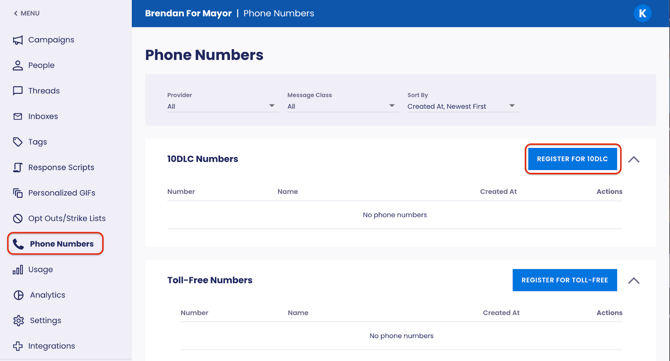
1. Navigate to your Scale to Win Text account’s **Phone Numbers** page.
2. Click **Register for 10DLC**. This takes you to the 10DLC registration form.
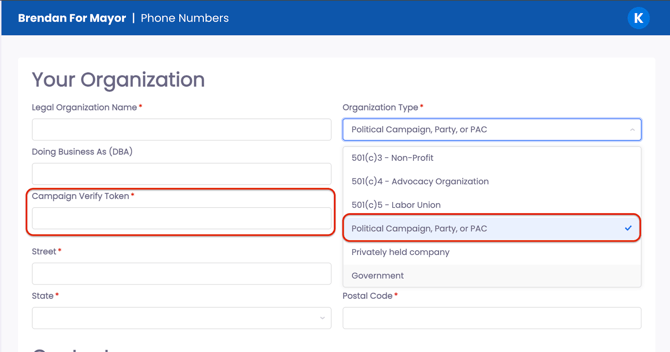
3. After selecting "Political Campaign, Party, or PAC" as the **Organization Type**, the Campaign Verify Token field becomes visible.
4. Enter your **Campaign Verify token**.
5. Complete the form and click **Submit For Review**.

### **View The Status Of Your Registration**
You can view the status of your registration in your **Phone Numbers** page. Expect your registration to remain in "pending" status for 7-10 business days while downstream vendors read through your submission for approval.

Once your registration is approved, the pending banner disappears and Organization Owners receive an automated email confirming a 10DLC phone number has been added to your account.
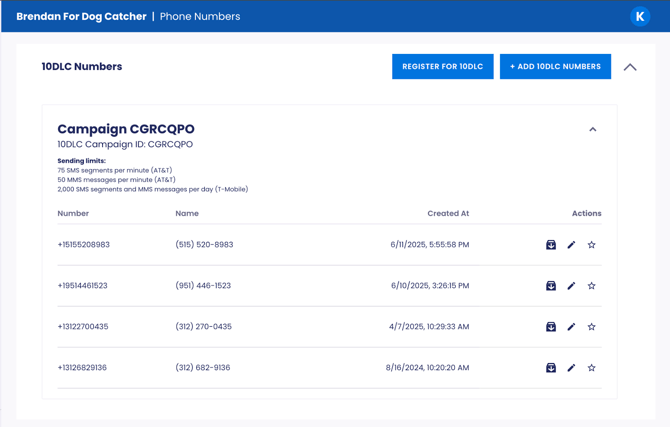
Your **Phone Numbers** page now displays your 10DLC number(s) and enables the addition of up to 49 phone numbers to the registration.
### **Special Cases**
If you’re a:
- political party stumping for many different candidates
- or otherwise foresee a nuanced registration process
[Please schedule a call with us](https://calendly.com/scale-to-win/10dlc-q-a) to ensure proper registration.
### **Registering Multiple Teams**
Accounts with multiple teams or subaccounts can register individual subaccounts for 10DLC by following the same steps above. To set up subaccounts, follow the steps outlined i[n this article](https://support.scaletowin.com/subaccounts?hsLang=en). For each subaccount you wish to register as a separate entity, submit the 10DLC registration form in that subaccount's **Phone Numbers** page. **Note:** To apply the same 10DLC registration to more than one subaccount, reach out to our Client Support team.
#### **Example: Group with Multiple Chapters**
If your multi-chapter organization (single EIN) requires separate subaccounts for each chapter, (e.g., one per state) create the subaccounts first. Then, specify in your 10DLC registration whether it applies to all or specific subaccounts.
### **Troubleshooting**
If you have issues submitting your registration form, or have general questions about the registration process, click here to book time to chat with our Registration Ops Team, or [submit a ticket to our Client Support team](https://support.scaletowin.com/contact?hsLang=en).
### **Suggested Articles**
- [10DLC Overview, Fees, and FAQs](https://support.scaletowin.com/10dlc-overview-fees-and-faqs?hsLang=en)
- [Campaign Verify Registration Guide](https://support.scaletowin.com/campaign-verify-registration-guide?hsLang=en)
- [Crafting a Compliant Website for 10DLC & Toll-Free Registration](https://support.scaletowin.com/crafting-a-compliant-website-for-10dlc-toll-free-registration?hsLang=en)
- [Scale to Win Text](https://support.scaletowin.com/scale-to-win-text?hsLang=en#main-content)
- [Getting Started](https://support.scaletowin.com/scale-to-win-text?hsLang=en#getting-started)
- [Creating Text Campaigns](https://support.scaletowin.com/scale-to-win-text?hsLang=en#creating-text-campaigns)
- [Navigating Your Menu & Features](https://support.scaletowin.com/scale-to-win-text?hsLang=en#navigating-your-menu-features)
- [Integrations & Data Management](https://support.scaletowin.com/scale-to-win-text?hsLang=en#integrations-data-management)
- [Best Practices, Troubleshooting & FAQs](https://support.scaletowin.com/scale-to-win-text?hsLang=en#best-practices-troubleshooting-faqs)
- [Glossary](https://support.scaletowin.com/scale-to-win-text?hsLang=en#glossary)
- [Scale To Win Text | Phone Number Registration](https://support.scaletowin.com/scale-to-win-text-phone-number-registration?hsLang=en#main-content)
- [10DLC](https://support.scaletowin.com/scale-to-win-text-phone-number-registration?hsLang=en#10dlc)
- [Short Code](https://support.scaletowin.com/scale-to-win-text-phone-number-registration?hsLang=en#short-code)
- [Compliance Guidelines](https://support.scaletowin.com/scale-to-win-text-phone-number-registration?hsLang=en#compliance-guidelines)
- [Scale To Win Text | Phone Number Types](https://support.scaletowin.com/scale-to-win-text-phone-number-types?hsLang=en#main-content)
- [10DLC](https://support.scaletowin.com/scale-to-win-text-phone-number-types?hsLang=en#10dlc)
- [Short Code](https://support.scaletowin.com/scale-to-win-text-phone-number-types?hsLang=en#short-code)
- [Scale To Win Text | Guides for Texters](https://support.scaletowin.com/scale-to-win-text-guides-for-texters?hsLang=en#main-content)
- [Getting Started](https://support.scaletowin.com/scale-to-win-text-guides-for-texters?hsLang=en#getting-started)
- [Texter View](https://support.scaletowin.com/scale-to-win-text-guides-for-texters?hsLang=en#texter-view)
- [Scale to Win Dialer](https://support.scaletowin.com/scale-to-win-dialer?hsLang=en#main-content)
- [Getting Started](https://support.scaletowin.com/scale-to-win-dialer?hsLang=en#getting-started)
- [Creating Call Campaigns](https://support.scaletowin.com/scale-to-win-dialer?hsLang=en#creating-call-campaigns)
- [Features](https://support.scaletowin.com/scale-to-win-dialer?hsLang=en#features)
- [Navigating Your Menu](https://support.scaletowin.com/scale-to-win-dialer?hsLang=en#navigating-your-menu)
- [Managing Call Campaigns](https://support.scaletowin.com/scale-to-win-dialer?hsLang=en#managing-call-campaigns)
- [Integrations & Data Management](https://support.scaletowin.com/scale-to-win-dialer?hsLang=en#integrations-data-management)
- [Caller Academy | Guides for Callers](https://support.scaletowin.com/caller-academy-guides-for-callers?hsLang=en#main-content)
- [Getting Started](https://support.scaletowin.com/caller-academy-guides-for-callers?hsLang=en#getting-started)
- [Making Calls & Clicking](https://support.scaletowin.com/caller-academy-guides-for-callers?hsLang=en#making-calls-clicking)
- [Billing](https://support.scaletowin.com/billing?hsLang=en#main-content)
- [Setting up your billing portal](https://support.scaletowin.com/billing?hsLang=en#setting-up-your-billing-portal)
- [Payment Methods](https://support.scaletowin.com/billing?hsLang=en#payment-methods)
- [Understanding Charges](https://support.scaletowin.com/billing?hsLang=en#understanding-charges)
[](http://scaletowin.com)
Copyright © 2025, Scale to Win