---
title: Answering Machine Detection (AMD) and Power-Dialing
description: The STW Dialer offers Default AMD to maximize call speed and Power-Dialing to ensure every contact, including voicemails, is reached.
---
[Skip to content](https://support.scaletowin.com/amd#main-content)
English
Show submenu for translations
[](https://www.scaletowin.com/)
Open main navigation
Close main navigation
- English
Show submenu for translations
- [Contact us](https://support.scaletowin.com/contact)
[Contact us](https://support.scaletowin.com/contact?hsLang=en)
Hi! How can we help?
- There are no suggestions because the search field is empty.
1. [Scale to Win](https://support.scaletowin.com/?hsLang=en)
2. [Scale to Win Dialer](https://support.scaletowin.com/scale-to-win-dialer?hsLang=en)
3. [Creating Call Campaigns](https://support.scaletowin.com/scale-to-win-dialer?hsLang=en#creating-call-campaigns)
# Answering Machine Detection (AMD) and Power-Dialing
The Scale to Win Dialer offers you two ways to maximize the impact of your call campaigns.
1. Use our **Default Answering Machine Detection** (AMD) option to avoid most voicemail boxes and leave pre-recorded messages on landlines.
OR
2. Disable Answering Machine Detection (AMD) to utilize **Power-Dialing**. This feature ensures individual callers are linked to every call, including those that reach voicemail.
**To Enable AMD And Power-Dialing In Your Dialer Account**
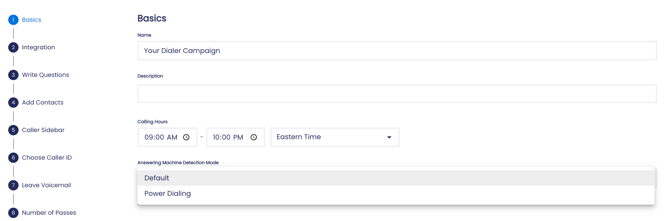
Select either the **Default** or **Power-Dialing** options from the **Basics** section (step 1) of the campaign builder in your dialer account.
### **AMD (Default Option)**
Our Default AMD option is best for average phonebanking experiences when you have many callers and want to maximize outbound call attempts.
Callers will only connect to likely humans, dial numbers faster, and reach fewer voicemails. Callers will have more conversations per hour, but may miss meaningful conversations.
Dialer campaigns use this AMD setting by default, but you can change this in the **Basics** (step 1) in a campaign.
**Scenario:** If you are leading a phonebank with many callers and your goal is to make as many call attempts as quickly as possible, this option is best for you. Default AMD means that callers will generally have a better/faster experience because they will hit far fewer voicemail messages.
---
### **Power-Dialing:**
Our Power-Dialing option will attempt to connect callers to every number that picks up. You will have fewer conversations per hour, but you will maximize the number of conversations from your list.
The dialer will not detect answering machines, and you can’t use the voicemail drop feature. Your callers will connect to contacts’ voicemail boxes when using this feature.
**Note:** You can switch between the Default and Power-Dialing options from the **Basics** (step 1) of a campaign.
**Scenario:** Your callers are calling a small list and you’re worried that Default AMD will call too quickly and mislabel real pick-ups as answering machines. The Power Dialing feature is a great way to ensure that you connect to as many contacts on the list as possible.
**Scenario:** You want to reach voicemail boxes so that callers can leave manual voicemail messages. The Power-Dialing feature is your best option.
**Scenario:** If you are a candidate doing Call Time, and you want to talk to as many contacts as possible with the option to leave personalized voicemails, the Power-Dialing feature will work for you!
### **Suggested Articles:**
- [Getting Started with the Scale to Win Dialer](https://support.scaletowin.com/getting-started-with-the-scale-to-win-dialer?hsLang=en)
- [Create a New Call Campaign](https://support.scaletowin.com/step-1-create-a-new-call-campaign?hsLang=en)
- [Passes](https://support.scaletowin.com/step-8-number-of-passes?hsLang=en)
- [Scale to Win Text](https://support.scaletowin.com/scale-to-win-text?hsLang=en#main-content)
- [Getting Started](https://support.scaletowin.com/scale-to-win-text?hsLang=en#getting-started)
- [Creating Text Campaigns](https://support.scaletowin.com/scale-to-win-text?hsLang=en#creating-text-campaigns)
- [Navigating Your Menu & Features](https://support.scaletowin.com/scale-to-win-text?hsLang=en#navigating-your-menu-features)
- [Integrations & Data Management](https://support.scaletowin.com/scale-to-win-text?hsLang=en#integrations-data-management)
- [Best Practices, Troubleshooting & FAQs](https://support.scaletowin.com/scale-to-win-text?hsLang=en#best-practices-troubleshooting-faqs)
- [Glossary](https://support.scaletowin.com/scale-to-win-text?hsLang=en#glossary)
- [Scale To Win Text | Phone Number Registration](https://support.scaletowin.com/scale-to-win-text-phone-number-registration?hsLang=en#main-content)
- [10DLC](https://support.scaletowin.com/scale-to-win-text-phone-number-registration?hsLang=en#10dlc)
- [Short Code](https://support.scaletowin.com/scale-to-win-text-phone-number-registration?hsLang=en#short-code)
- [Compliance Guidelines](https://support.scaletowin.com/scale-to-win-text-phone-number-registration?hsLang=en#compliance-guidelines)
- [Scale To Win Text | Phone Number Types](https://support.scaletowin.com/scale-to-win-text-phone-number-types?hsLang=en#main-content)
- [10DLC](https://support.scaletowin.com/scale-to-win-text-phone-number-types?hsLang=en#10dlc)
- [Short Code](https://support.scaletowin.com/scale-to-win-text-phone-number-types?hsLang=en#short-code)
- [Scale To Win Text | Guides for Texters](https://support.scaletowin.com/scale-to-win-text-guides-for-texters?hsLang=en#main-content)
- [Getting Started](https://support.scaletowin.com/scale-to-win-text-guides-for-texters?hsLang=en#getting-started)
- [Texter View](https://support.scaletowin.com/scale-to-win-text-guides-for-texters?hsLang=en#texter-view)
- [Scale to Win Dialer](https://support.scaletowin.com/scale-to-win-dialer?hsLang=en#main-content)
- [Getting Started](https://support.scaletowin.com/scale-to-win-dialer?hsLang=en#getting-started)
- [Creating Call Campaigns](https://support.scaletowin.com/scale-to-win-dialer?hsLang=en#creating-call-campaigns)
- [Features](https://support.scaletowin.com/scale-to-win-dialer?hsLang=en#features)
- [Navigating Your Menu](https://support.scaletowin.com/scale-to-win-dialer?hsLang=en#navigating-your-menu)
- [Managing Call Campaigns](https://support.scaletowin.com/scale-to-win-dialer?hsLang=en#managing-call-campaigns)
- [Integrations & Data Management](https://support.scaletowin.com/scale-to-win-dialer?hsLang=en#integrations-data-management)
- [Caller Academy | Guides for Callers](https://support.scaletowin.com/caller-academy-guides-for-callers?hsLang=en#main-content)
- [Getting Started](https://support.scaletowin.com/caller-academy-guides-for-callers?hsLang=en#getting-started)
- [Making Calls & Clicking](https://support.scaletowin.com/caller-academy-guides-for-callers?hsLang=en#making-calls-clicking)
- [Billing](https://support.scaletowin.com/billing?hsLang=en#main-content)
- [Setting up your billing portal](https://support.scaletowin.com/billing?hsLang=en#setting-up-your-billing-portal)
- [Payment Methods](https://support.scaletowin.com/billing?hsLang=en#payment-methods)
- [Understanding Charges](https://support.scaletowin.com/billing?hsLang=en#understanding-charges)
[](http://scaletowin.com)
Copyright © 2025, Scale to Win