---
title: Analytics Dashboard
description: Learn how to view your analytics dashboard
---
[Skip to content](https://support.scaletowin.com/analytics-dashboard#main-content)
English
Show submenu for translations
[](https://www.scaletowin.com/)
Open main navigation
Close main navigation
- English
Show submenu for translations
- [Contact us](https://support.scaletowin.com/contact)
[Contact us](https://support.scaletowin.com/contact?hsLang=en)
Hi! How can we help?
- There are no suggestions because the search field is empty.
1. [Scale to Win](https://support.scaletowin.com/?hsLang=en)
2. [Scale to Win Text](https://support.scaletowin.com/scale-to-win-text?hsLang=en)
3. [Navigating Your Menu & Features](https://support.scaletowin.com/scale-to-win-text?hsLang=en#navigating-your-menu-features)
# Analytics Dashboard
| **TABLE OF CONTENTS** |
| --- |
| - [Viewing Your Analytics Dashboard (Subaccount Level)](https://support.scaletowin.com/analytics-dashboard#viewing-analytics-dashboard-subaccount) - [Viewing Your Analytics Dashboard (Organization Level)](https://support.scaletowin.com/analytics-dashboard#viewing-analytics-dashboard-organization) - [Fundraising Dashboard](https://support.scaletowin.com/analytics-dashboard#fundraising-dashboard) - [Historical Fundraising Performance](https://support.scaletowin.com/analytics-dashboard#historical-fundraising-performance) - [Top Performing Campaigns Table](https://support.scaletowin.com/analytics-dashboard#top-performing-campaigns) - [Monthly ROI](https://support.scaletowin.com/analytics-dashboard#monthly-roi) - [Monthly Donations by Type](https://support.scaletowin.com/analytics-dashboard#monthly-donations-by-type) - [Monthly Average Donation](https://support.scaletowin.com/analytics-dashboard#monthly-average-donation) - [Donor Conversion Rate](https://support.scaletowin.com/analytics-dashboard#donor-conversion-rate) - [Link Conversion](https://support.scaletowin.com/analytics-dashboard#link-conversion) - [Organizing Dashboard](https://support.scaletowin.com/analytics-dashboard#organizing-dashboard) - [Campaign Organizing Overview - Key Metrics](https://support.scaletowin.com/analytics-dashboard#campaign-organizing-overivew-key) - [Texter Leaderboard](https://support.scaletowin.com/analytics-dashboard#texter-leaderboard) - [Top Tags](https://support.scaletowin.com/analytics-dashboard#top-tags) - [Replies and Opt-Outs](https://support.scaletowin.com/analytics-dashboard#replies-opt-outs) - [Suggested Articles](https://support.scaletowin.com/analytics-dashboard#suggested-articles) |
The Analytics Dashboard provides insights into campaign performance through detailed metrics, graphs, and tables for both fundraising and organizing activity. You can access metrics on your Analytics Dashboard at both the Subaccount and Organization level.
**Note:** Metrics at the Organization level will only differ from those at the subaccount level if you have more than one active subaccount.
#### **Viewing Your Analytics Dashboard (Subaccount Level)**
Navigate to your **Analytics** page located on the left-hand menu. You can choose to view analytics for either **Fundraising** or **Organizing**.
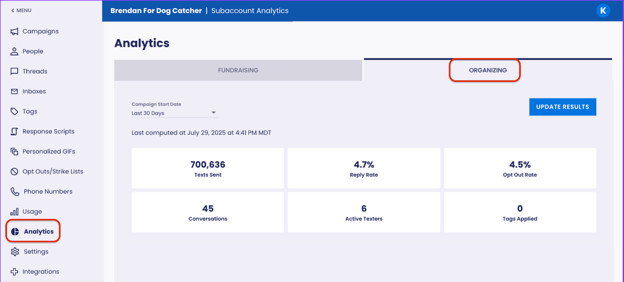
### **Select a Campaign Start Date Range**
**1.** Use the dropdown menu to select your desired timeframe. This will filter the campaigns displayed on the dashboard.
**Note:** By default, dashboards show campaigns from the past 30 days.
**2.** Click **Update Results** to refresh the data.

**3. To sort a table**, click the arrow that appears when hovering over the right side of the column header. This sorts the table by that column's values (ascending or descending).

**4. Download Data:** To export data as a CSV, click the three-dot menu in the top right corner of any table or chart, then select **Download Data**.

**Note:** Data refreshes every 15 minutes or upon clicking **Update Results**. Last refresh date and time appear below Campaign Start Date.
#### **Viewing Your Analytics Dashboard (Organization Level)**
Navigate to your **Analytics** page located on the left-hand menu. You can choose to view analytics for either **Fundraising** or **Organizing**.
**1.** Select **Organization Settings** from the drop-down menu in the top right-hand corner.
**2. Navigate** to the Analytics page.
**3.** Select to view analytics for either **Fundraising** or **Organizing.**
**4.** Proceed with the steps outlined in the **Subaccount Level Dashboard** previously mentioned above.

---
### **Fundraising Dashboard**
**Note:** You must have an ActBlue integration and link tracking enabled. Only campaigns that have received at least one donation will appear.
### **Recent Fundraising Performance**
****
**ROI**: Amount campaigns raised compared to their cost to send.
- (Total Donation Amount ÷ Total Sending Cost) × 100
**Average Donation**: Average amount of money donated per donation.
- Total Donation Amount ÷ Total Number of Donations
**Total Raised:** Total dollar amount raised from all donations.
**Texts Sent:** Total number of text messages sent during the campaign (includes errored messages).
**Donations**: Total number of individual donations received (includes both one-time and the first recurring donation).
**Total Raised (One-Time)**: Total amount raised from one-time donations only (excludes recurring gifts).
**Donor Conversion Rate**: Rate of unique donors texted who donated.
- (Unique Donors ÷ Unique People Texted) × 100
**Link Conversion**: Percentage of contacts who clicked a donation link and completed a donation.
- (Unique Donors ÷ Unique Link Clickers) × 100
**Total Raised (Recurring):** Total amount raised from recurring donations only (excludes one-time gifts).
**Note:** A "Unique Donor" refers to a contact who has made at least one donation within the specified date range. Each donor is counted only once, regardless of the number of donations made, and this metric is not influenced by their past donation history.
### **Historical Fundraising Performance**
****
**Note:** Metrics reflect lifetime data for all campaigns with an ActBlue integration and link tracking, regardless of the selected campaign start date.
**Lifetime ROI:** ROI across all campaigns, all time.
- (All-Time Total Donation Amount ÷ All-Time Total Sending Cost) × 100
**Lifetime Average Donation**: Average donation across all campaigns, all time.
- All-Time Total Donation Amount ÷ All-Time Total Number of Donations
**Lifetime Amount Raised**: Total amount raised across all campaigns, all time.
### **Top Performing Campaigns Table**
****
**Note:** Each row in the table shows metrics for one individual campaign
**Campaign Name**: Name of the campaign.
**Overall ROI**: Amount a campaign raised compared to its cost to send.
**Total Messages Sent:** Total number of text messages sent.
**Total Amount Raised (Dollars):** Total dollar amount raised.
**Total Donations**: Total number of individual donations received.
**Overall Average Donation (Dollars)**: Overall average amount donated per gift.
- Total Donation Amount ÷ Total Number of Donations
**Donor Rate**: Percentage of contacts who donated after receiving a text.
- (Unique Donors ÷ Unique People Texted) × 100
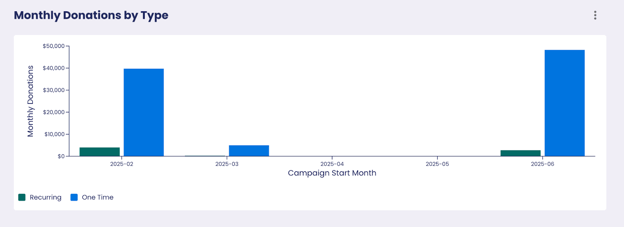
**Monthly Fundraising VisualizationsNote:** Graphs in this section are grouped by campaign start month and reflect all-time activity.
### **Monthly ROI**
### **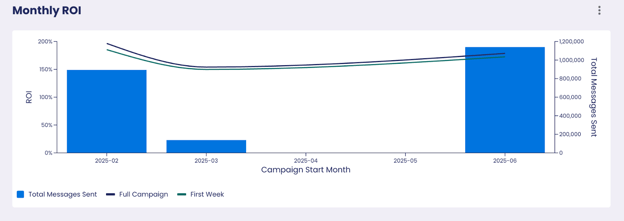**
**Full Campaign ROI:** ROI for campaigns launched in a specific month, calculated over the entire campaign duration.
**First Week ROI**: ROI for the first 7 days of campaigns that began that month.
- (Amount Raised in First 7 Days ÷ Sending Cost in First 7 Days) x 100
**Total Messages Sent**: Total messages sent for all campaigns started that month.
### **Monthly Donations by Type**
A side-by-side view of **one-time** vs **recurring** donations, grouped by the month the campaign started.
### ****
### **Monthly Average Donation**
### **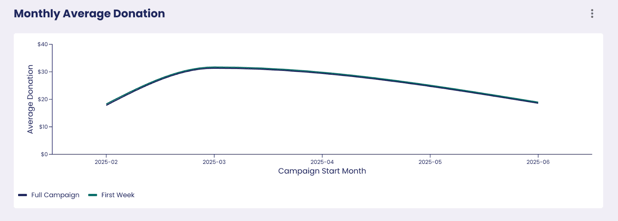**
**Full Campaign**: Average donation amount for campaigns launched in a specific month, calculated over the entire campaign duration.
- Campaign Avg Donation = Total Raised ÷ Number of Donations Then:
- Monthly Avg = (Sum of Campaign Avg Donations) ÷ Number of Campaigns Started That Month
**First Week:** Average donation amount during the first 7 days of campaigns launched in a specific month.
- First Week Avg (per campaign) = Total Raised in First Week ÷ Number of Donations in First Week Then:
- Monthly Avg = (Sum of First Week Avg Donations) ÷ Number of Campaigns Started That Month
### **Donor Conversion Rate**
### Percentage of contacts who donated after receiving a text, grouped by the campaign launch month.
- (Unique Donors ÷ Unique People Texted) × 100

### **Link Conversion**
### Percentage of contacts who clicked the link and donated, grouped by the campaign launch month.
- (Unique Donors ÷ Unique Link Clickers) × 100

---
#### **Organizing Dashboard**
### **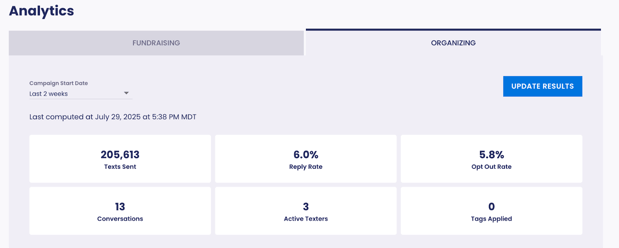**
**Summary MetricsNote:** All metrics on this page are filtered by the selected campaign start date range.
**Texts Sent:** Total number of text messages sent during the campaign (Includes errored messages).
**Reply Rate:** Rate of contacts who responded after receiving a message.
- (Unique Contacts Who Replied ÷ Total Contacts Texted) x 100
**Opt Out Rate:** Rate of contacts that unsubscribed after being texted.
- (Contacts Who Opted Out ÷ Total Contacts Texted) x 100
**Conversations:** Number of unique contacts who were messaged by texters (does not include contacts who opted out).
**Active Texters**: Number of Texters that sent at least one message.
**Tags Applied:** Number of tag/contact pairs (not deduplicated).
**Note:** “Unique contacts” and “unique link clickers” refer to contacts that may appear multiple times though they are only counted once.
### **Campaign Organizing Overview - Key Metrics**
****
**Note:** Each row represents a campaign that started during the selected timeframe.
**Campaign Name**: Name of the campaign.
**Campaign Start Date**: Day the campaign began sending messages.
**Texts Sent:** Total number of text messages sent during the campaign (includes errored messages).
**Active Texters:** Users who sent at least one message.
**Conversations:** The number of contacts who replied to the initial message and received a follow-up message from the Texter. Does not include people who opted out.
**Reply Rate:** Percentage of contacts who responded.
- (Unique Contacts Who Replied ÷ Total Contacts Texted) x 100
**Opt Out Rate:** Rate of contacts that unsubscribed after being texted.
- (Contacts Who Opted Out ÷ Total Contacts Texted) x 100
### **Texter Leaderboard**
**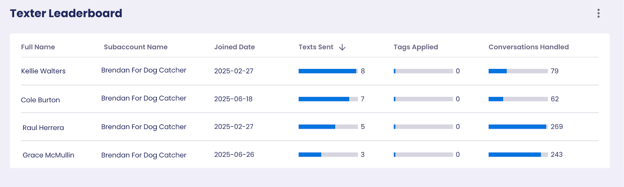**
**Note:** Texters appear in multiple rows if they participated in more than one subaccount.
**Joined Date:** Date the user was added to the subaccount.
**Texts Sent:** Total number of text messages sent by user.
**Tags Applied:** Total number of tags applied to contacts by user.
**Conversations Handled:** Total threads with texter engagement (messages sent, opt-outs, tag management, escalations, etc.).
### **Top Tags**
### Displays how tags are being used across campaigns launched in the selected time range.

**Campaign Contact Tags:** Total number of tags applied to contacts.
**Percent of Tags:** Tag distribution as a percentage of total tags applied.
- (Number of Times Tag Was Applied ÷ Total Tags Applied) × 100
### **Replies and Opt-Outs**
**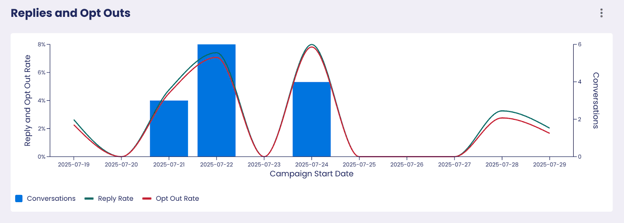**
**Note:** Metrics grouped by the day a campaign started (within the selected date range).
**Conversations:** The number of contacts who replied to the initial message and received a follow-up message from the Texter. Does not include people who opted out.
**Reply Rate:** Percentage of contacts who responded to a text message.
- (Unique Contacts Who Replied ÷ Total Contacts Texted) x 100
**Opt Out Rate:** Percentage of contacts who unsubscribed.
- (Contacts Who Opted Out ÷ Total Contacts Texted) x 100
#### **Suggested Articles:**
- [ActBlue Integration](https://support.scaletowin.com/act-blue-integrations-how-to-set-up?hsLang=en)
- [Script Variants Feature](https://support.scaletowin.com/scripts-variants-feature?hsLang=en)
- [Scale to Win Text](https://support.scaletowin.com/scale-to-win-text?hsLang=en#main-content)
- [Getting Started](https://support.scaletowin.com/scale-to-win-text?hsLang=en#getting-started)
- [Creating Text Campaigns](https://support.scaletowin.com/scale-to-win-text?hsLang=en#creating-text-campaigns)
- [Navigating Your Menu & Features](https://support.scaletowin.com/scale-to-win-text?hsLang=en#navigating-your-menu-features)
- [Integrations & Data Management](https://support.scaletowin.com/scale-to-win-text?hsLang=en#integrations-data-management)
- [Best Practices, Troubleshooting & FAQs](https://support.scaletowin.com/scale-to-win-text?hsLang=en#best-practices-troubleshooting-faqs)
- [Glossary](https://support.scaletowin.com/scale-to-win-text?hsLang=en#glossary)
- [Scale To Win Text | Phone Number Registration](https://support.scaletowin.com/scale-to-win-text-phone-number-registration?hsLang=en#main-content)
- [10DLC](https://support.scaletowin.com/scale-to-win-text-phone-number-registration?hsLang=en#10dlc)
- [Short Code](https://support.scaletowin.com/scale-to-win-text-phone-number-registration?hsLang=en#short-code)
- [Compliance Guidelines](https://support.scaletowin.com/scale-to-win-text-phone-number-registration?hsLang=en#compliance-guidelines)
- [Scale To Win Text | Phone Number Types](https://support.scaletowin.com/scale-to-win-text-phone-number-types?hsLang=en#main-content)
- [10DLC](https://support.scaletowin.com/scale-to-win-text-phone-number-types?hsLang=en#10dlc)
- [Short Code](https://support.scaletowin.com/scale-to-win-text-phone-number-types?hsLang=en#short-code)
- [Scale To Win Text | Guides for Texters](https://support.scaletowin.com/scale-to-win-text-guides-for-texters?hsLang=en#main-content)
- [Getting Started](https://support.scaletowin.com/scale-to-win-text-guides-for-texters?hsLang=en#getting-started)
- [Texter View](https://support.scaletowin.com/scale-to-win-text-guides-for-texters?hsLang=en#texter-view)
- [Scale to Win Dialer](https://support.scaletowin.com/scale-to-win-dialer?hsLang=en#main-content)
- [Getting Started](https://support.scaletowin.com/scale-to-win-dialer?hsLang=en#getting-started)
- [Creating Call Campaigns](https://support.scaletowin.com/scale-to-win-dialer?hsLang=en#creating-call-campaigns)
- [Features](https://support.scaletowin.com/scale-to-win-dialer?hsLang=en#features)
- [Navigating Your Menu](https://support.scaletowin.com/scale-to-win-dialer?hsLang=en#navigating-your-menu)
- [Managing Call Campaigns](https://support.scaletowin.com/scale-to-win-dialer?hsLang=en#managing-call-campaigns)
- [Integrations & Data Management](https://support.scaletowin.com/scale-to-win-dialer?hsLang=en#integrations-data-management)
- [Caller Academy | Guides for Callers](https://support.scaletowin.com/caller-academy-guides-for-callers?hsLang=en#main-content)
- [Getting Started](https://support.scaletowin.com/caller-academy-guides-for-callers?hsLang=en#getting-started)
- [Making Calls & Clicking](https://support.scaletowin.com/caller-academy-guides-for-callers?hsLang=en#making-calls-clicking)
- [Billing](https://support.scaletowin.com/billing?hsLang=en#main-content)
- [Setting up your billing portal](https://support.scaletowin.com/billing?hsLang=en#setting-up-your-billing-portal)
- [Payment Methods](https://support.scaletowin.com/billing?hsLang=en#payment-methods)
- [Understanding Charges](https://support.scaletowin.com/billing?hsLang=en#understanding-charges)
[](http://scaletowin.com)
Copyright © 2025, Scale to Win