---
title: Calculating your Costs and Usage
description: Learn how to track, analyze, and calculate your messaging and calling costs on the Usage Page. This guide covers SMS segments, MMS, dials, and voicemails, plus filtering by date, exporting usage reports, and understanding your billing schedule.
---
[Skip to content](https://support.scaletowin.com/calculating-your-costs-and-usage#main-content)
English
Show submenu for translations
[](https://www.scaletowin.com/)
Open main navigation
Close main navigation
- English
Show submenu for translations
- [Contact us](https://support.scaletowin.com/contact)
[Contact us](https://support.scaletowin.com/contact?hsLang=en)
Hi! How can we help?
- There are no suggestions because the search field is empty.
1. [Scale to Win](https://support.scaletowin.com/?hsLang=en)
2. [Billing](https://support.scaletowin.com/billing?hsLang=en)
3. [Understanding Charges](https://support.scaletowin.com/billing?hsLang=en#understanding-charges)
# Calculating your Costs and Usage
## Billing Portal: https://scaletowin.invoiced.com
| **TABLE OF CONTENTS** |
| --- |
| - [Products and Costs](https://support.scaletowin.com/calculating-your-costs-and-usage#products-and-costs) - [Finding Your Text/Dialer Usage](https://support.scaletowin.com/calculating-your-costs-and-usage#finding-your-text-usage) - [- For One Team (subaccount)](https://support.scaletowin.com/calculating-your-costs-and-usage#one_team) - [- For Multiple Teams (Subaccounts)](https://support.scaletowin.com/calculating-your-costs-and-usage#multiple_teams) - [- Filter by Date](https://support.scaletowin.com/calculating-your-costs-and-usage#filter_date) - [Analyzing Your Usage](https://support.scaletowin.com/calculating-your-costs-and-usage#analyzing-your-usage) - [- SMS segments vs SMS messages](https://support.scaletowin.com/calculating-your-costs-and-usage#sms_segments) - [- Visual Breakdown](https://support.scaletowin.com/calculating-your-costs-and-usage#visual_breakdown) - [- Usage by Campaign](https://support.scaletowin.com/calculating-your-costs-and-usage#usage_campaign) - [- Exporting Usage](https://support.scaletowin.com/calculating-your-costs-and-usage#exporting_usage) - [Billing Schedule](https://support.scaletowin.com/calculating-your-costs-and-usage#billing-schedule) |
The Usage Page is your go-to destination for tracking and managing your messaging and calling activities within our platform. Whether you're using our texting or calling product, this comprehensive guide will walk you through the features and functionalities of the Usage Page.
### Products and Costs
We have 4 main products we bill for:
- SMS segments (*not messages* - each segment is 153 characters \*\*we recommend keeping each message under 4 segments\*\*)
- MMS messages (picture messages)
- Dials (each dial made, whether or not you connect to a person)
- Voicemails (each voicemail left on a landline number)
Each product has a unique rate that can be found in your Scale to Win contract.
In order to calculate your costs to date, you will need to find your text and/or dialer usage. Multiply the quantity by your rate to find out your costs per product. The aggregate to find your total costs:
**Amount of SMS Segments x SMS rate = SMS Cost**
**Amount of MMS Messages x MMS rate = MMS Cost**
**Amount of Dials x Dialer rate = Dials Cost**
**Amount of Voicemails x VM rate = Voicemail Cost**
**SMS Cost + MMS Cost + Dials Cost + Voicemail Cost = Total Cost**
### Finding Your Text/Dialer Usage
### - For One Team (subaccount)
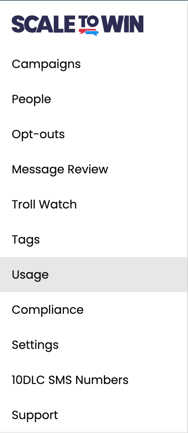
For **text** usage of an individual team, click on the Usage link in the menu bar.
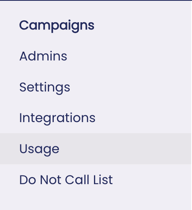
For **dialer** usage of an individual Subaccount, click on the Usage link as well.
### - For Multiple Teams (Subaccounts)
To find **text** usage for multiple Teams, click on the Global Settings tab at the bottom of the menu bar.

Then select Global Usage.

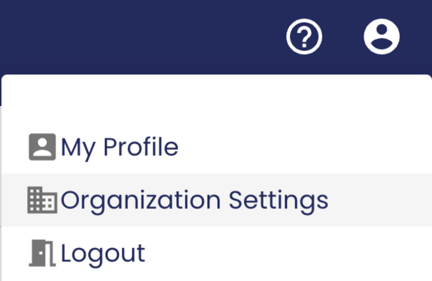
To find **dialer** usage for multiple teams, click on the Settings tab. Select Organization Settings.
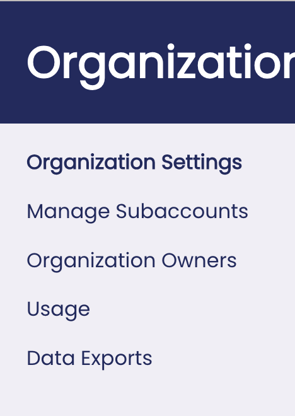
Then select Usage.
### - Filter by Date
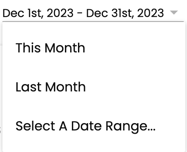
At the top right, you will be able to filter by date. Metrics for the selected date range will appear.
### Analyzing Your Usage
The Usage Page breaks down your usage with a graphic representation by date. Use the top bar to calculate your total costs for the time period selected.
### - SMS segments vs SMS messages
Scale to Win charges per SMS segment, not per SMS message. When calculating your usage please make sure to only take note of the segments as shown here:

### - Visual Breakdown
A graph breaks down your daily usage by date. Hovering over each bar will display the breakdown of SMS Segments and MMS in the texting platform or the calls and dials in the dialer platform
Hovering over each bar will display the breakdown of SMS Segments and MMS in the texting platform or the calls and dials in the dialer platform.

### - Usage by Campaign
Below the graph you will find a breakdown by campaign. Please note that we do not invoice by campaign but you can use this section to calculate your costs per campaign:

\*\*Make sure to look for segments, not messages\*\*
### - Exporting Usage
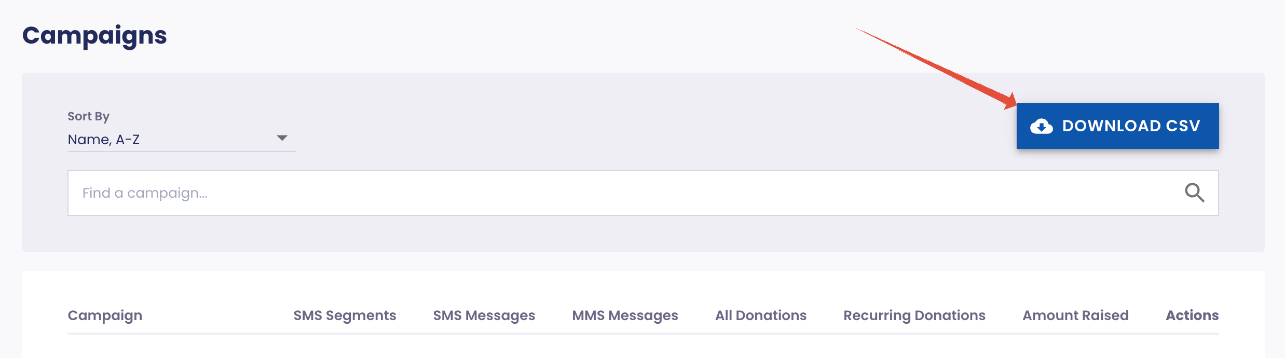
Click on Download CSV to view a breakdown by campaign - our invoices show a breakdown by item so this information will help supplement your usage review.
### Billing Schedule
Read [our guide](https://support.scaletowin.com/billing-for-teams?hsLang=en) to learn about our billing schedule for both electoral and non-electoral customers.
Learn More:
- [How to Access and Download W9 and Past Invoices](https://support.scaletowin.com/how-to-access-and-download-w9-and-past-invoices?hsLang=en)
- [How Do I Pay My Invoice?](https://support.scaletowin.com/how-do-i-pay-my-invoice?hsLang=en)
- [Payment Methods and Autopay](https://support.scaletowin.com/payment-methods-and-autopay?hsLang=en)
- [How to Add or Update Your Billing Contact Information](https://support.scaletowin.com/how-to-add-or-update-your-billing-contact-information?hsLang=en)
- [When Will I Be Billed?](https://support.scaletowin.com/when-will-i-be-billed?hsLang=en)
- [How do I Make a Partial Payment?](https://support.scaletowin.com/how-to-make-a-partial-payment?hsLang=en)
- [Scale to Win Text](https://support.scaletowin.com/scale-to-win-text?hsLang=en#main-content)
- [Getting Started](https://support.scaletowin.com/scale-to-win-text?hsLang=en#getting-started)
- [Creating Text Campaigns](https://support.scaletowin.com/scale-to-win-text?hsLang=en#creating-text-campaigns)
- [Navigating Your Menu & Features](https://support.scaletowin.com/scale-to-win-text?hsLang=en#navigating-your-menu-features)
- [Integrations & Data Management](https://support.scaletowin.com/scale-to-win-text?hsLang=en#integrations-data-management)
- [Best Practices, Troubleshooting & FAQs](https://support.scaletowin.com/scale-to-win-text?hsLang=en#best-practices-troubleshooting-faqs)
- [Glossary](https://support.scaletowin.com/scale-to-win-text?hsLang=en#glossary)
- [Scale To Win Text | Phone Number Registration](https://support.scaletowin.com/scale-to-win-text-phone-number-registration?hsLang=en#main-content)
- [10DLC](https://support.scaletowin.com/scale-to-win-text-phone-number-registration?hsLang=en#10dlc)
- [Short Code](https://support.scaletowin.com/scale-to-win-text-phone-number-registration?hsLang=en#short-code)
- [Compliance Guidelines](https://support.scaletowin.com/scale-to-win-text-phone-number-registration?hsLang=en#compliance-guidelines)
- [Scale To Win Text | Phone Number Types](https://support.scaletowin.com/scale-to-win-text-phone-number-types?hsLang=en#main-content)
- [10DLC](https://support.scaletowin.com/scale-to-win-text-phone-number-types?hsLang=en#10dlc)
- [Short Code](https://support.scaletowin.com/scale-to-win-text-phone-number-types?hsLang=en#short-code)
- [Scale To Win Text | Guides for Texters](https://support.scaletowin.com/scale-to-win-text-guides-for-texters?hsLang=en#main-content)
- [Getting Started](https://support.scaletowin.com/scale-to-win-text-guides-for-texters?hsLang=en#getting-started)
- [Texter View](https://support.scaletowin.com/scale-to-win-text-guides-for-texters?hsLang=en#texter-view)
- [Scale to Win Dialer](https://support.scaletowin.com/scale-to-win-dialer?hsLang=en#main-content)
- [Getting Started](https://support.scaletowin.com/scale-to-win-dialer?hsLang=en#getting-started)
- [Creating Call Campaigns](https://support.scaletowin.com/scale-to-win-dialer?hsLang=en#creating-call-campaigns)
- [Features](https://support.scaletowin.com/scale-to-win-dialer?hsLang=en#features)
- [Navigating Your Menu](https://support.scaletowin.com/scale-to-win-dialer?hsLang=en#navigating-your-menu)
- [Managing Call Campaigns](https://support.scaletowin.com/scale-to-win-dialer?hsLang=en#managing-call-campaigns)
- [Integrations & Data Management](https://support.scaletowin.com/scale-to-win-dialer?hsLang=en#integrations-data-management)
- [Caller Academy | Guides for Callers](https://support.scaletowin.com/caller-academy-guides-for-callers?hsLang=en#main-content)
- [Getting Started](https://support.scaletowin.com/caller-academy-guides-for-callers?hsLang=en#getting-started)
- [Making Calls & Clicking](https://support.scaletowin.com/caller-academy-guides-for-callers?hsLang=en#making-calls-clicking)
- [Billing](https://support.scaletowin.com/billing?hsLang=en#main-content)
- [Setting up your billing portal](https://support.scaletowin.com/billing?hsLang=en#setting-up-your-billing-portal)
- [Payment Methods](https://support.scaletowin.com/billing?hsLang=en#payment-methods)
- [Understanding Charges](https://support.scaletowin.com/billing?hsLang=en#understanding-charges)
[](http://scaletowin.com)
Copyright © 2025, Scale to Win