---
title: Data to Win Enhanced Filters
description: filter your contact list using anonymized data
---
[Skip to content](https://support.scaletowin.com/data-to-win#main-content)
English
Show submenu for translations
[](https://www.scaletowin.com/)
Open main navigation
Close main navigation
- English
Show submenu for translations
- [Contact us](https://support.scaletowin.com/contact)
[Contact us](https://support.scaletowin.com/contact?hsLang=en)
Hi! How can we help?
- There are no suggestions because the search field is empty.
1. [Scale to Win](https://support.scaletowin.com/?hsLang=en)
2. [Scale to Win Text](https://support.scaletowin.com/scale-to-win-text?hsLang=en)
3. [Integrations & Data Management](https://support.scaletowin.com/scale-to-win-text?hsLang=en#integrations-data-management)
# Data to Win Enhanced Filters
## Data to Win Enhanced Filtering enables you to refine your target universes and lists using anonymized engagement and donation data from other participating Data to Win organizations.
**Note:** To access Data to Win Enhanced Filters, you’ll need to sign a simple contract addendum. Get started by emailing our support team to learn more.
| **TABLE OF CONTENTS** - [Using Data to Win Enhanced Filters](https://support.scaletowin.com/data-to-win#using-data-to-win) - [What data is accessible via Data to Win](https://support.scaletowin.com/data-to-win#what-data-is-accessible) - [Turning on Data to Win Enhanced Filters](https://support.scaletowin.com/data-to-win#turning-on-dtw) - [Frequently Asked Questions](https://support.scaletowin.com/data-to-win#frequently-asked-questions) |
| --- |
### **Using Data to Win Enhanced Filters**
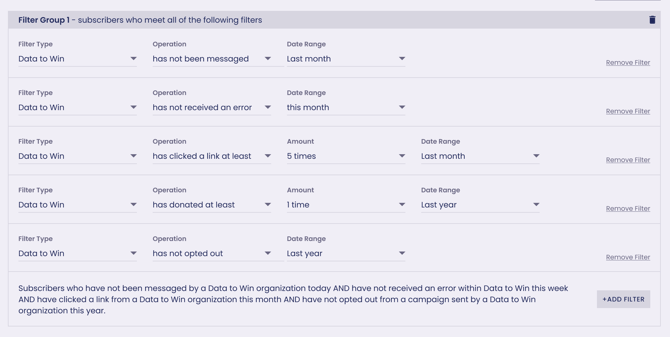
Once enabled, Data to Win filters will be available as a filter type in Audiences and Step 3: Load Contacts. Select Data to Win to access a new set of filter operations that reference the pooled data in Data to Win.
****
### **Filter options**
- Has / has not been sent a message within a period of time
- Has / has not clicked at least x times within a period of time
- Has / has not replied at least x times within a period of time
- Has / has not donated at least x times within a period of time
- Has not received a send error within a period of time
##### **Date range options**
- All Time
- Last year
- This year
- Last month
- This month
- Specific data range
Complete your filters by clicking the **Apply Filters** button. You can also save your filters for later reference and use them by clicking **Saved Search**.
Data to Win filters can be combined with other filter types and options to help target your list.
Note: Data to Win Enhanced Filters will only filter against your existing list of contacts. You cannot “pull in” net new contacts to your organization from Data to Win.
### **What data is accessible via Data to Win?**
Data to Win only filters existing contacts in your audience using Engagement and Donation data. It does **not** grant you access to net new contacts or to any personally identifiable information (PII) outside of the information already in your possession.
If you choose to participate in Data to Win, the engagement history for contacts in your past campaigns (including whether they opted out, replied, donated) is shared with the Data to Win pool. That data is associated with a phone number, which will serve as a unique identifier in Data to Win. Engagement data from other participating organizations that have also sent to that number will be sent to Data to Win and associated with that number. This data is abstracted and reduced, meaning specific information, for example, which organization messaged the contact, what organizations they donated to, and how much they donated, is not available in Data to Win or available to other organizations. Data to Win members will only know if a contact engaged with a past send, how they engaged, and when.
To simplify, the data available to filter with Data to Win is:
- Send Successes
- Send Failures
- Donations
- Clicks
- Opt-Outs
### **Turning on Data to Win Enhanced Filters**
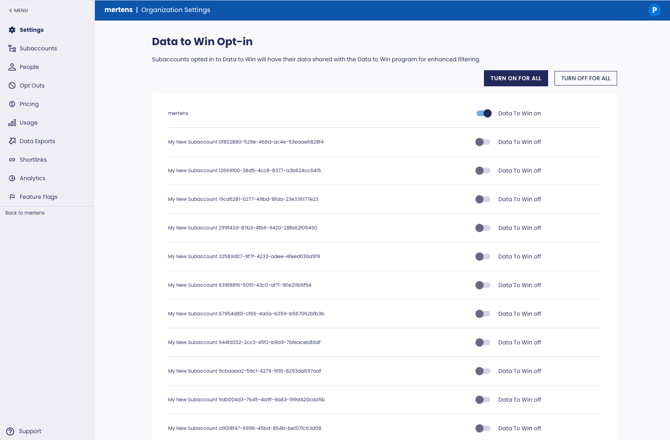
You can enable Data to Win for an entire organization or for specific subaccounts. To enable it, go to your Organization Settings page and scroll down to Data to Win Opt-In. Here, you can opt in all subaccounts or individually select the subaccounts that have agreed to participate.
### **Frequently Asked Questions**
**Q. What organizations or Scale to Win clients are able to participate in Data to Win?**
1. Participation in Data to Win is open to all Scale to Win clients with a contract. An additional contract addendum will be required that outlines terms, conditions, and acceptable use.
**Q. Can I choose which pieces of data to contribute to Data to Win?**
1. If you choose to participate in Data to Win, you agree to send the data outlined in the list above. You cannot specify, at the campaign or data-point level, which information contributes to Data to Win is sent. But you can choose which subaccounts will participate in Data to Win!
**Q. Can I export the data from uploaded contacts to use in other places, or will it only be accessible in the STWT platform?**
1. Audiences, Saved Searches, and imported contacts to a campaign using Data to Win filters cannot be exported. Data to Win filters and query results are only for use in the Scale To Win Text platform.
**Q.** **How often is Data to Win data updated?**
1. Data to Win data will be refreshed nightly. However, your filters and searches can be used in real time and will not need to be queued for processing.
- [Scale to Win Text](https://support.scaletowin.com/scale-to-win-text?hsLang=en#main-content)
- [Getting Started](https://support.scaletowin.com/scale-to-win-text?hsLang=en#getting-started)
- [Creating Text Campaigns](https://support.scaletowin.com/scale-to-win-text?hsLang=en#creating-text-campaigns)
- [Navigating Your Menu & Features](https://support.scaletowin.com/scale-to-win-text?hsLang=en#navigating-your-menu-features)
- [Integrations & Data Management](https://support.scaletowin.com/scale-to-win-text?hsLang=en#integrations-data-management)
- [Best Practices, Troubleshooting & FAQs](https://support.scaletowin.com/scale-to-win-text?hsLang=en#best-practices-troubleshooting-faqs)
- [Glossary](https://support.scaletowin.com/scale-to-win-text?hsLang=en#glossary)
- [Scale To Win Text | Phone Number Registration](https://support.scaletowin.com/scale-to-win-text-phone-number-registration?hsLang=en#main-content)
- [10DLC](https://support.scaletowin.com/scale-to-win-text-phone-number-registration?hsLang=en#10dlc)
- [Short Code](https://support.scaletowin.com/scale-to-win-text-phone-number-registration?hsLang=en#short-code)
- [Compliance Guidelines](https://support.scaletowin.com/scale-to-win-text-phone-number-registration?hsLang=en#compliance-guidelines)
- [Scale To Win Text | Phone Number Types](https://support.scaletowin.com/scale-to-win-text-phone-number-types?hsLang=en#main-content)
- [10DLC](https://support.scaletowin.com/scale-to-win-text-phone-number-types?hsLang=en#10dlc)
- [Short Code](https://support.scaletowin.com/scale-to-win-text-phone-number-types?hsLang=en#short-code)
- [Scale To Win Text | Guides for Texters](https://support.scaletowin.com/scale-to-win-text-guides-for-texters?hsLang=en#main-content)
- [Getting Started](https://support.scaletowin.com/scale-to-win-text-guides-for-texters?hsLang=en#getting-started)
- [Texter View](https://support.scaletowin.com/scale-to-win-text-guides-for-texters?hsLang=en#texter-view)
- [Scale to Win Dialer](https://support.scaletowin.com/scale-to-win-dialer?hsLang=en#main-content)
- [Getting Started](https://support.scaletowin.com/scale-to-win-dialer?hsLang=en#getting-started)
- [Creating Call Campaigns](https://support.scaletowin.com/scale-to-win-dialer?hsLang=en#creating-call-campaigns)
- [Features](https://support.scaletowin.com/scale-to-win-dialer?hsLang=en#features)
- [Navigating Your Menu](https://support.scaletowin.com/scale-to-win-dialer?hsLang=en#navigating-your-menu)
- [Managing Call Campaigns](https://support.scaletowin.com/scale-to-win-dialer?hsLang=en#managing-call-campaigns)
- [Integrations & Data Management](https://support.scaletowin.com/scale-to-win-dialer?hsLang=en#integrations-data-management)
- [Caller Academy | Guides for Callers](https://support.scaletowin.com/caller-academy-guides-for-callers?hsLang=en#main-content)
- [Getting Started](https://support.scaletowin.com/caller-academy-guides-for-callers?hsLang=en#getting-started)
- [Making Calls & Clicking](https://support.scaletowin.com/caller-academy-guides-for-callers?hsLang=en#making-calls-clicking)
- [Billing](https://support.scaletowin.com/billing?hsLang=en#main-content)
- [Setting up your billing portal](https://support.scaletowin.com/billing?hsLang=en#setting-up-your-billing-portal)
- [Payment Methods](https://support.scaletowin.com/billing?hsLang=en#payment-methods)
- [Understanding Charges](https://support.scaletowin.com/billing?hsLang=en#understanding-charges)
[](http://scaletowin.com)
Copyright © 2025, Scale to Win