
For every campaign you start, you can export the data collected. You'll tell Spoke to export the data, then receive an email with links to download your data in the CSV file format.
|
TABLE OF CONTENTS
|
Step 1: Export Data from Spoke
From the admin side of Spoke, click on the campaign you'd like to export. The option to export the campaign will be the second option in the upper right corner of the campaign's data display.
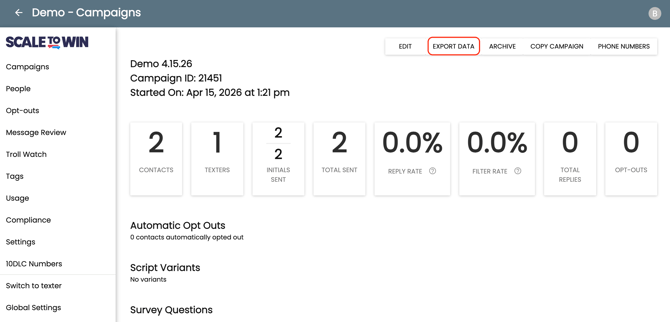
Image showing where to find the “Export Data” button on a campaign.
Note: You can export data from active or archived campaigns.
Step 2: Access exports in your email inbox
When you click the “Export Data” button, an email will be sent to your account with links to download the campaign data. The download links are active for 24 hours.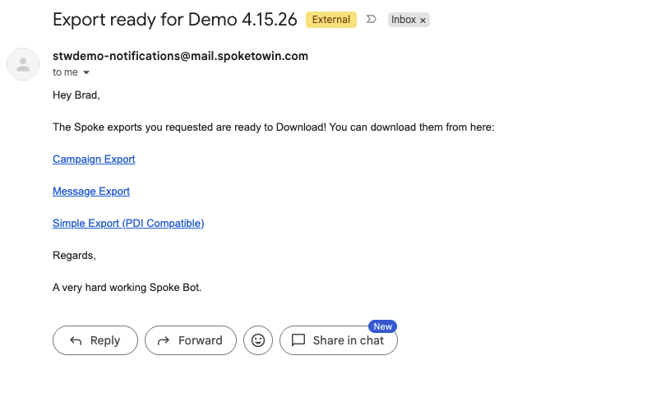
Once your exports are ready, you’ll receive an email with links to download the data in different export formats. Read more below on the difference between the three links.
Click the links to download your data.
Note: Be aware that large campaigns contain a lot of data and may take a few minutes to process and be delivered to your email inbox.
What are the different export types?
Spoke offers three export types: Campaign Export, Message Export, and Simple Export.
-
Campaign Export - A file that contains every contact in your text campaign row by row including first name, last name, phone number and any other custom fields you may have included, along with columns that provide data on the conversation status, deliverability, survey response dispositions, and tags.
-
Message Export - This file contains every message that was sent and received on the text campaign. Because this can be a very large file, specific contact information is not included. However, you can identify each message by the phone number. Note: the time sent column is in the UTC timezone.
-
Simple Export (PDI Compatible) - This file is similar to the Campaign Export, but has fewer columns and is formatted in a different way to allow for an easier bulk upload into the PDI voter file platform.