---
title: "Organization Settings: Subaccounts"
description: Learn how to organize subaccounts.
---
[Skip to content](https://support.scaletowin.com/organization-settings-subaccounts#main-content)
English
Show submenu for translations
[](https://www.scaletowin.com/)
Open main navigation
Close main navigation
- English
Show submenu for translations
- [Contact us](https://support.scaletowin.com/contact)
[Contact us](https://support.scaletowin.com/contact?hsLang=en)
Hi! How can we help?
- There are no suggestions because the search field is empty.
1. [Scale to Win](https://support.scaletowin.com/?hsLang=en)
2. [Scale to Win Text](https://support.scaletowin.com/scale-to-win-text?hsLang=en)
3. [Navigating Your Menu & Features](https://support.scaletowin.com/scale-to-win-text?hsLang=en#navigating-your-menu-features)
# Organization Settings: Subaccounts
Subaccounts are like teams that you can access with the same login URL. Each subaccount has its own set of campaigns, phone numbers, users, conversation histories, and settings. With Scale to Win Text, you can easily create your own subaccounts to manage different texting programs from one place.
If you have more than one team, you'll get a single invoice that shows each team's usage. We can send separate invoices for each team. Please request this by sending an email to [billing@scaletowin.com](mailto:billing@scaletowin.com). Click here to learn more about invoices.
| **Table of Contents** |
| --- |
| - [Add Subaccounts](https://support.scaletowin.com/organization-settings-subaccounts#add-subaccounts) - [View Subaccounts](https://support.scaletowin.com/organization-settings-subaccounts#view-subaccounts) - [Access to Subaccounts](https://support.scaletowin.com/organization-settings-subaccounts#Access-to-Subaccounts) - [Phone Numbers for Subaccounts](https://support.scaletowin.com/organization-settings-subaccounts#phone-numbers-to-subaccounts) - [Link Shorteners for Subaccounts](https://support.scaletowin.com/organization-settings-subaccounts#link-shorteners-for-subaccounts) - [Requesting a Separate Billing Profile for your Subaccount](https://support.scaletowin.com/organization-settings-subaccounts#separate-billing-profile) |
### **Add Subaccounts**
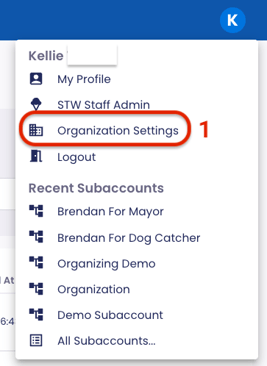
1. Navigate to your **Organization Settings.**
****
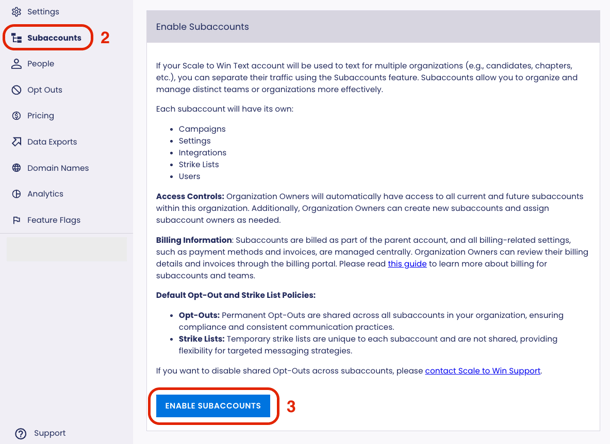
2. Click **Subaccounts** in the top left-hand corner.
3. Click the **Enable Subaccounts** button.
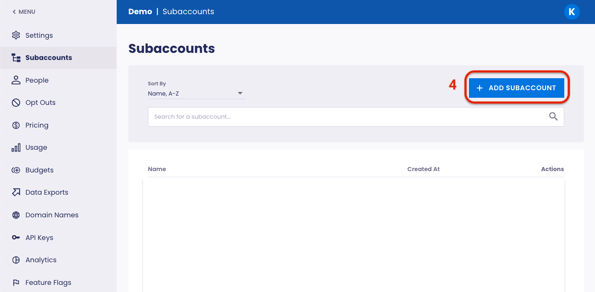
4. Click **+ Add Subaccount.
**
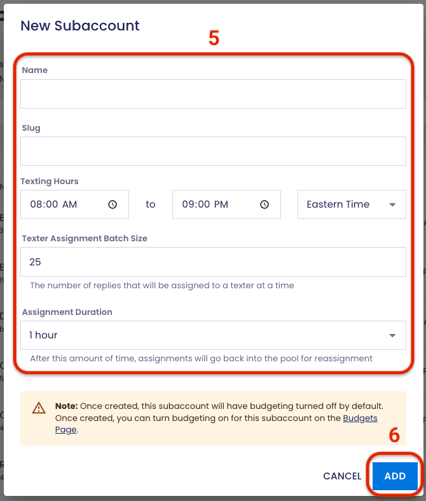
5. Enter your subaccount name and slug (client ID) in the pop-up window and confirm texting settings.
6. Click **Add.**
### View Subaccounts
Once you create subaccounts, you’ll see a complete list that you can search and sort by name or creation date.
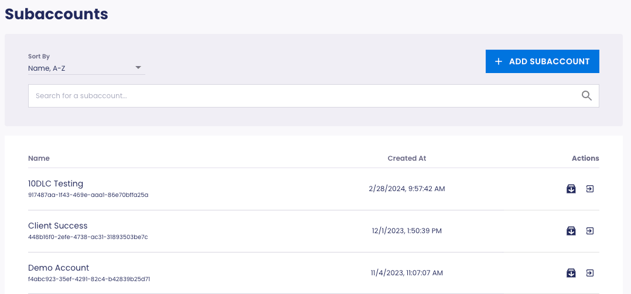
*Image above: Once subaccounts are created, you’ll see a page where you can create and navigate to subaccounts.*
### **Access to Subaccounts**
Organization Owners have access to all subaccounts. New team members who should only have access to a specific subaccount(s) can be added from that subaccount’s People page.
### **Phone Numbers for Subaccounts**
Subaccounts don’t automatically come with phone numbers. You can either register the subaccount for phone numbers on the Phone Numbers page or ask us to apply an existing registration to it. Submit a ticket.
### **Link Shorteners for Subaccounts**
Organization Owners can request web domains to be used as link shorteners on your account. Once the request is fulfilled, you can enable link shortening from the Settings page in your subaccount.
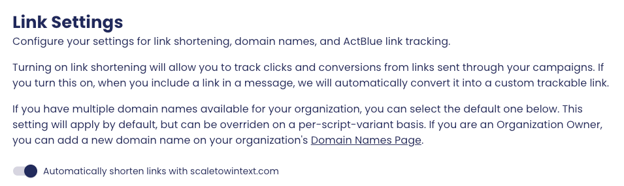
*Image above: Once a shortlink has been set up by your Organization Owner, you can enable automatic link shortening the Settings page.*
### **Requesting a Separate Billing Profile for your Subaccount**
If you would like to create a separate billing profile for your new subaccount, please complete the [New Subaccount Billing Profile Request form](https://docs.google.com/forms/d/e/1FAIpQLScu5yM7C-IXoDKHRA36gKNLD8oGOIuqv4drGFI4vFXD1PEkZA/viewform?usp=dialog). After completion, an email will be automatically sent to the address provided, prompting you to add your payment information.
To learn more more about Billing for Subaccounts, visit our Knowledge Base article [here](https://support.scaletowin.com/billing-for-subaccounts?hsLang=en).
- [Scale to Win Text](https://support.scaletowin.com/scale-to-win-text?hsLang=en#main-content)
- [Getting Started](https://support.scaletowin.com/scale-to-win-text?hsLang=en#getting-started)
- [Creating Text Campaigns](https://support.scaletowin.com/scale-to-win-text?hsLang=en#creating-text-campaigns)
- [Navigating Your Menu & Features](https://support.scaletowin.com/scale-to-win-text?hsLang=en#navigating-your-menu-features)
- [Integrations & Data Management](https://support.scaletowin.com/scale-to-win-text?hsLang=en#integrations-data-management)
- [Best Practices, Troubleshooting & FAQs](https://support.scaletowin.com/scale-to-win-text?hsLang=en#best-practices-troubleshooting-faqs)
- [Glossary](https://support.scaletowin.com/scale-to-win-text?hsLang=en#glossary)
- [Scale To Win Text | Phone Number Registration](https://support.scaletowin.com/scale-to-win-text-phone-number-registration?hsLang=en#main-content)
- [10DLC](https://support.scaletowin.com/scale-to-win-text-phone-number-registration?hsLang=en#10dlc)
- [Short Code](https://support.scaletowin.com/scale-to-win-text-phone-number-registration?hsLang=en#short-code)
- [Compliance Guidelines](https://support.scaletowin.com/scale-to-win-text-phone-number-registration?hsLang=en#compliance-guidelines)
- [Scale To Win Text | Phone Number Types](https://support.scaletowin.com/scale-to-win-text-phone-number-types?hsLang=en#main-content)
- [10DLC](https://support.scaletowin.com/scale-to-win-text-phone-number-types?hsLang=en#10dlc)
- [Short Code](https://support.scaletowin.com/scale-to-win-text-phone-number-types?hsLang=en#short-code)
- [Scale To Win Text | Guides for Texters](https://support.scaletowin.com/scale-to-win-text-guides-for-texters?hsLang=en#main-content)
- [Getting Started](https://support.scaletowin.com/scale-to-win-text-guides-for-texters?hsLang=en#getting-started)
- [Texter View](https://support.scaletowin.com/scale-to-win-text-guides-for-texters?hsLang=en#texter-view)
- [Scale to Win Dialer](https://support.scaletowin.com/scale-to-win-dialer?hsLang=en#main-content)
- [Getting Started](https://support.scaletowin.com/scale-to-win-dialer?hsLang=en#getting-started)
- [Creating Call Campaigns](https://support.scaletowin.com/scale-to-win-dialer?hsLang=en#creating-call-campaigns)
- [Features](https://support.scaletowin.com/scale-to-win-dialer?hsLang=en#features)
- [Navigating Your Menu](https://support.scaletowin.com/scale-to-win-dialer?hsLang=en#navigating-your-menu)
- [Managing Call Campaigns](https://support.scaletowin.com/scale-to-win-dialer?hsLang=en#managing-call-campaigns)
- [Integrations & Data Management](https://support.scaletowin.com/scale-to-win-dialer?hsLang=en#integrations-data-management)
- [Caller Academy | Guides for Callers](https://support.scaletowin.com/caller-academy-guides-for-callers?hsLang=en#main-content)
- [Getting Started](https://support.scaletowin.com/caller-academy-guides-for-callers?hsLang=en#getting-started)
- [Making Calls & Clicking](https://support.scaletowin.com/caller-academy-guides-for-callers?hsLang=en#making-calls-clicking)
- [Billing](https://support.scaletowin.com/billing?hsLang=en#main-content)
- [Setting up your billing portal](https://support.scaletowin.com/billing?hsLang=en#setting-up-your-billing-portal)
- [Payment Methods](https://support.scaletowin.com/billing?hsLang=en#payment-methods)
- [Understanding Charges](https://support.scaletowin.com/billing?hsLang=en#understanding-charges)
[](http://scaletowin.com)
Copyright © 2025, Scale to Win