---
title: Requesting Domains & Using Shortlinks
description: Learn how to request domains and use shortlinks
---
[Skip to content](https://support.scaletowin.com/requesting-domains-using-shortlinks#main-content)
English
Show submenu for translations
[](https://www.scaletowin.com/)
Open main navigation
Close main navigation
- English
Show submenu for translations
- [Contact us](https://support.scaletowin.com/contact)
[Contact us](https://support.scaletowin.com/contact?hsLang=en)
Hi! How can we help?
- There are no suggestions because the search field is empty.
1. [Scale to Win](https://support.scaletowin.com/?hsLang=en)
2. [Scale to Win Text](https://support.scaletowin.com/scale-to-win-text?hsLang=en)
3. [Getting Started](https://support.scaletowin.com/scale-to-win-text?hsLang=en#getting-started)
# Requesting Domains & Using Shortlinks
Link shortening allows you to convert long URLs into shorter, more manageable links. These shortened links are easy to include in your text campaigns and can provide powerful insights by tracking link clicks. You can use this data to build contact lists based on clicking behavior (for example, reaching out to contacts who clicked the link but did not donate) and see stats like conversion rates.
**Note:** Link shortening and click tracking are interconnected features. To utilize click tracking, you will need to have a shortlink enabled.
#### **Requesting a Domain**
Only Organization Owners can request domains at this time. Scale to Win allows a maximum of **two domains per subaccount**.
**To request a domain:**
- Click on your initial in the upper right corner of your screen and select **Organization Settings**.
- Navigate to **Domain Names** and select **Request Domain**.
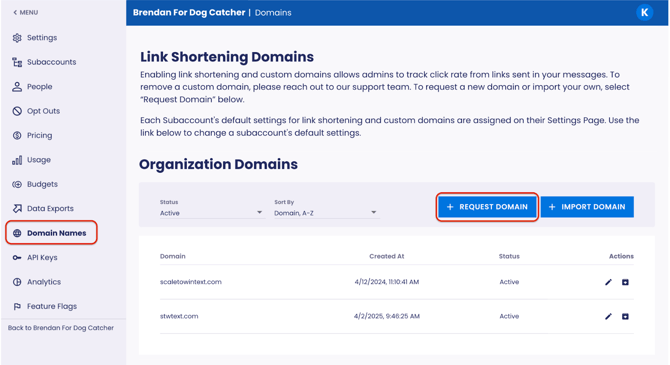
- **Search and select an available domain**. Requesting a domain is not purchasing one. It is possible that your desired domain could become unavailable before we can purchase it.
- **Submit your Fallback URL.** Your shortlink will direct contacts to the website entered in your initial message, not the Fallback URL. The Fallback URL is the website your shortlink will direct to if for some reason the link in your initial message breaks, and is often your organization’s homepage or campaign website.
#### **Enable Link Shortening**
Once your shortlink is active, you will need to configure your settings for link shortening.
- Navigate to your subaccount **Settings** page.
- Scroll to your **Link Settings** and toggle on**Automatically Shorten Links**.
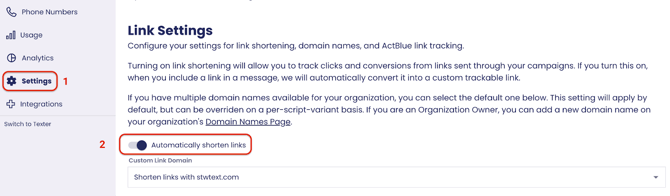
#### **Note:** Once this setting is on, **every link** you include in an initial message will automatically convert into your custom link domain.
#### 
#### **Using Shortlinks in Text Campaigns**
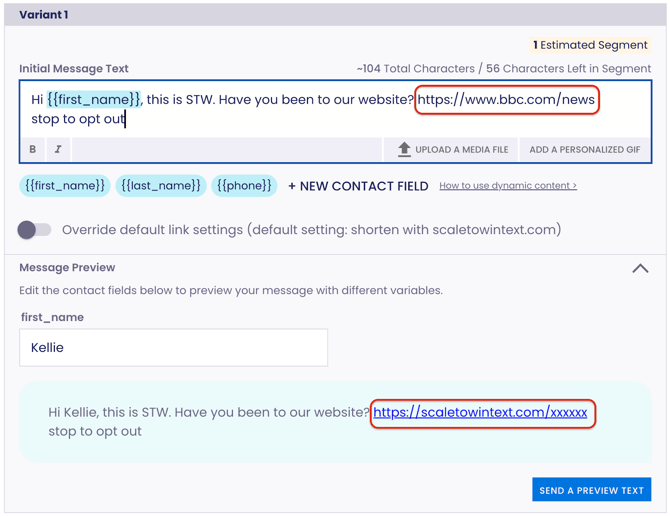
Once your shortlink is active, you can use it in your Initial Message. **Note:** At this time, shortlinks can only be used in your Initial Message.
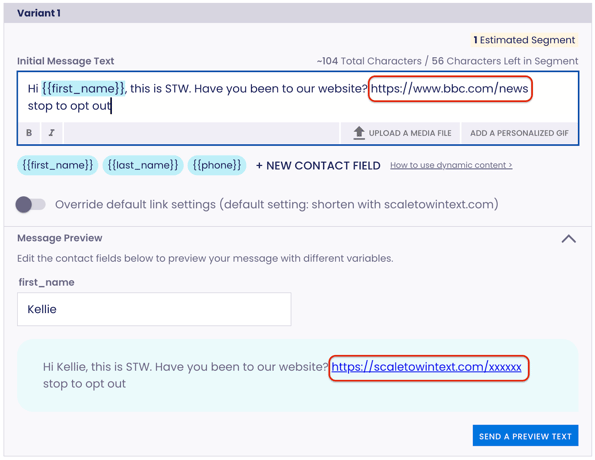
- In the **Initial Message** step of building your campaign, write your initial message in the Initial Message Text field, including the **full URL address** of the website you want your contacts to be directed to.
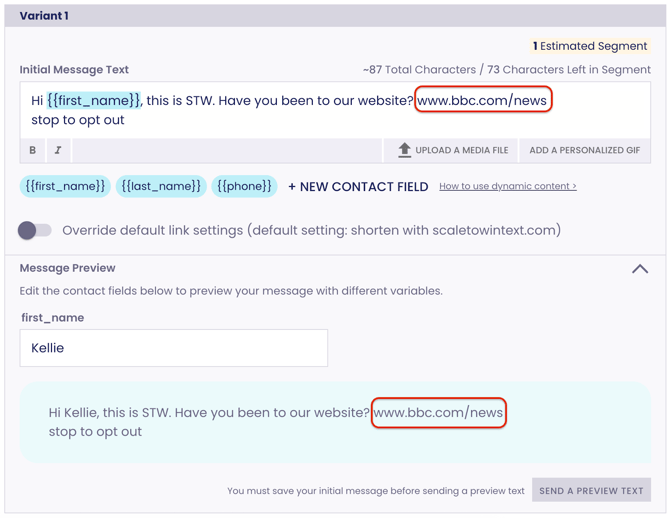
**Note:** You must include ***https://*** in your web address for the shortlink to work.
- Confirm your **default link settings** are correct.
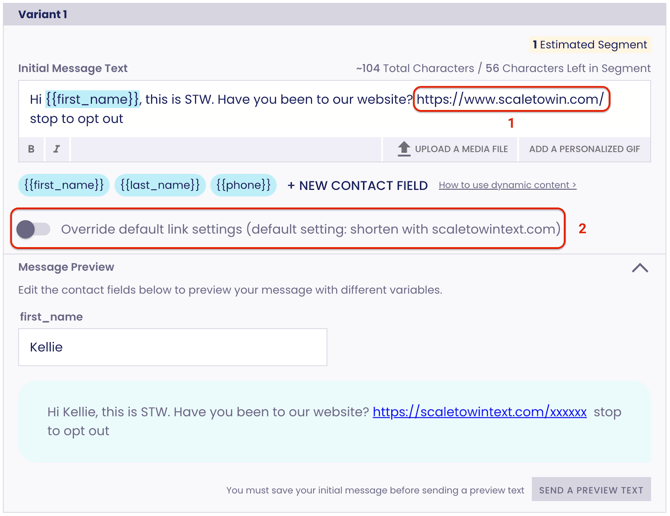
- Preview how your shortlink will appear by expanding the Message Preview field. **Note:** You want the link to show /xxxxxx at the end of your shortlink URL.
**Correct:**
**Incorrect:**
---
**Import Your Own Domain or Subdomain (not recommended)**If you currently own a domain (e.g., scaletowin.com) or subdomain (e.g., text.scaletowin.com) that you’d like to use, please note that enabling link shortening in STW Text will replace the current content on that domain. We recommend avoiding the use of actively used domains or subdomains for this feature. If you'd like to go this route, please [reach out to our support team.](https://scaletowin.freshdesk.com/support/tickets/new)
- [Scale to Win Text](https://support.scaletowin.com/scale-to-win-text?hsLang=en#main-content)
- [Getting Started](https://support.scaletowin.com/scale-to-win-text?hsLang=en#getting-started)
- [Creating Text Campaigns](https://support.scaletowin.com/scale-to-win-text?hsLang=en#creating-text-campaigns)
- [Navigating Your Menu & Features](https://support.scaletowin.com/scale-to-win-text?hsLang=en#navigating-your-menu-features)
- [Integrations & Data Management](https://support.scaletowin.com/scale-to-win-text?hsLang=en#integrations-data-management)
- [Best Practices, Troubleshooting & FAQs](https://support.scaletowin.com/scale-to-win-text?hsLang=en#best-practices-troubleshooting-faqs)
- [Glossary](https://support.scaletowin.com/scale-to-win-text?hsLang=en#glossary)
- [Scale To Win Text | Phone Number Registration](https://support.scaletowin.com/scale-to-win-text-phone-number-registration?hsLang=en#main-content)
- [10DLC](https://support.scaletowin.com/scale-to-win-text-phone-number-registration?hsLang=en#10dlc)
- [Short Code](https://support.scaletowin.com/scale-to-win-text-phone-number-registration?hsLang=en#short-code)
- [Compliance Guidelines](https://support.scaletowin.com/scale-to-win-text-phone-number-registration?hsLang=en#compliance-guidelines)
- [Scale To Win Text | Phone Number Types](https://support.scaletowin.com/scale-to-win-text-phone-number-types?hsLang=en#main-content)
- [10DLC](https://support.scaletowin.com/scale-to-win-text-phone-number-types?hsLang=en#10dlc)
- [Short Code](https://support.scaletowin.com/scale-to-win-text-phone-number-types?hsLang=en#short-code)
- [Scale To Win Text | Guides for Texters](https://support.scaletowin.com/scale-to-win-text-guides-for-texters?hsLang=en#main-content)
- [Getting Started](https://support.scaletowin.com/scale-to-win-text-guides-for-texters?hsLang=en#getting-started)
- [Texter View](https://support.scaletowin.com/scale-to-win-text-guides-for-texters?hsLang=en#texter-view)
- [Scale to Win Dialer](https://support.scaletowin.com/scale-to-win-dialer?hsLang=en#main-content)
- [Getting Started](https://support.scaletowin.com/scale-to-win-dialer?hsLang=en#getting-started)
- [Creating Call Campaigns](https://support.scaletowin.com/scale-to-win-dialer?hsLang=en#creating-call-campaigns)
- [Features](https://support.scaletowin.com/scale-to-win-dialer?hsLang=en#features)
- [Navigating Your Menu](https://support.scaletowin.com/scale-to-win-dialer?hsLang=en#navigating-your-menu)
- [Managing Call Campaigns](https://support.scaletowin.com/scale-to-win-dialer?hsLang=en#managing-call-campaigns)
- [Integrations & Data Management](https://support.scaletowin.com/scale-to-win-dialer?hsLang=en#integrations-data-management)
- [Caller Academy | Guides for Callers](https://support.scaletowin.com/caller-academy-guides-for-callers?hsLang=en#main-content)
- [Getting Started](https://support.scaletowin.com/caller-academy-guides-for-callers?hsLang=en#getting-started)
- [Making Calls & Clicking](https://support.scaletowin.com/caller-academy-guides-for-callers?hsLang=en#making-calls-clicking)
- [Billing](https://support.scaletowin.com/billing?hsLang=en#main-content)
- [Setting up your billing portal](https://support.scaletowin.com/billing?hsLang=en#setting-up-your-billing-portal)
- [Payment Methods](https://support.scaletowin.com/billing?hsLang=en#payment-methods)
- [Understanding Charges](https://support.scaletowin.com/billing?hsLang=en#understanding-charges)
[](http://scaletowin.com)
Copyright © 2025, Scale to Win