---
title: "Step 2: Set Up an NGP VAN Integration"
description: Learn how to Set Up an NGP VAN Integration
---
[Skip to content](https://support.scaletowin.com/step-2-set-up-an-ngp-van-integration#main-content)
English
Show submenu for translations
[](https://www.scaletowin.com/)
Open main navigation
Close main navigation
- English
Show submenu for translations
- [Contact us](https://support.scaletowin.com/contact)
[Contact us](https://support.scaletowin.com/contact?hsLang=en)
Hi! How can we help?
- There are no suggestions because the search field is empty.
1. [Scale to Win](https://support.scaletowin.com/?hsLang=en)
2. [Scale to Win Dialer](https://support.scaletowin.com/scale-to-win-dialer?hsLang=en)
3. [Creating Call Campaigns](https://support.scaletowin.com/scale-to-win-dialer?hsLang=en#creating-call-campaigns)
# Step 2: Set Up an NGP VAN Integration
You have the option to set up an ‘integration’ that links your Scale to Win Dialer organization with your campaign or organization’s NGP VAN account. This integration can import script questions, sync survey responses, activist codes, and canvass statuses back to your NGP VAN account. (Read more about the STW Dialer/NGP VAN Integration here.)
“Step 2” of setting up your call campaign pertains to this integration, which is **optional**.
When you arrive at Step 2, **you have** **four options for how to proceed,** based on whether or not you wish to set up and utilize an NGP VAN integration for this call campaign:
1. **No Integration**
Dialer organizations who haven’t set up an NGP VAN Integration and/or don’t want to, can simply click the “Continue” button on their screen, which will bypass this step in the campaign creation process and take you straight to Step 3.
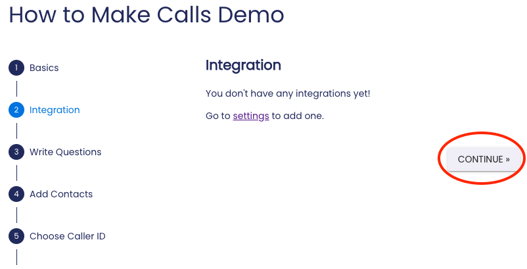
*If you haven’t set up an NGP VAN integration, you’ll see “You don’t have any integrations yet!” on your screen and can click “Continue” to move on to Step 3.*
2. **If you have an NGP VAN integration but don’t want to use it with this call campaign…**
Those who have previously set up an NGP VAN integration for their dialer organization but do not wish to use the integration with this particular call campaign should simply select **“None”** from the “Pick an integration” dropdown menu on your screen, and then click the “Save & Continue” button. This will bypass this step in the campaign creation process and take you straight to Step 3.
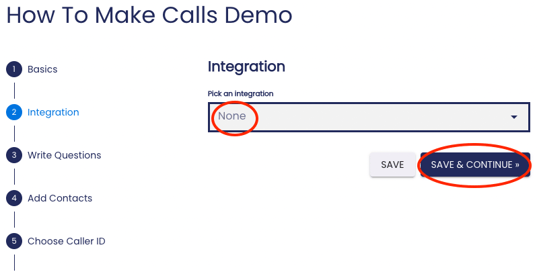
*The interface you’ll see in “Step 2” if you’ve previously set up an NGP VAN integration.*
3. **If you wish to set up an NGP VAN integration for the first time…**
If you want to integrate your NGP VAN account with your STW Dialer organization and have not done so previously, you will first need to [follow these instructions to set up an NGP VAN integration](https://support.scaletowin.com/how-to-set-up-van-integration?hsLang=en) for your STW Dialer organization as a whole.
Afterwards, come back to this step of your campaign creation process, and follow ‘option 4’.
4. **If you have an existing NGP VAN integration and want to use it with this call campaign...**
If you have already set up an NGP VAN integration for your STW Dialer organization, select which integration you want to use for this call campaign.
From the **“Pick an integration” dropdown menu**, select the NGP VAN integration(s) you wish to use for this call campaign.
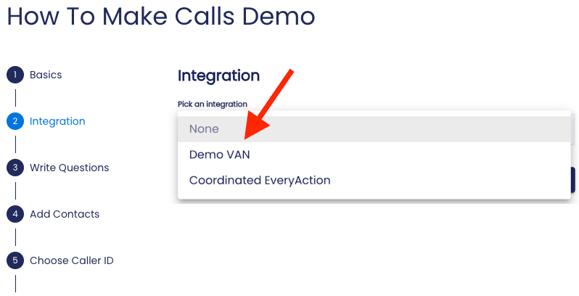
*An example of the “Pick an integration” dropdown menu for those who have already set up an NGP VAN integration for their dialer organization.*
You will see all the integrations that you or another admin for your dialer organization have previously set up. If you have multiple integrations (e.g., an integration for your NGP VAN EveryAction committee and an integration for your NGP VAN Votebuilder committee), be sure to select the correct NGP VAN committee where you’d like to sync results.
If you’re using Votebuilder, after you’ve selected the integration you’d like to use to sync back call results, you’ll be able to choose whether you’d like to sync results back to **My Campaign or My Voters** NGP VAN committee within your Votebuilder account. If you’re using NGP or EveryAction, you can skip this step and you’ll sync results back to your single committee by default.
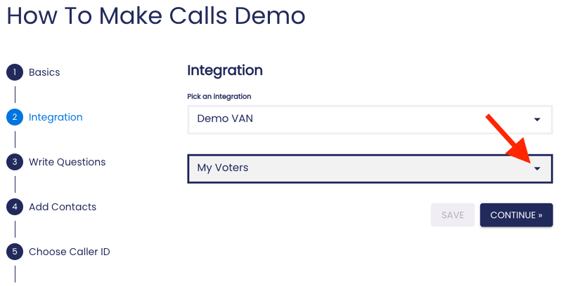
*If you’re using Votebuilder, select whether you’d like to send call results back to My Voters or My Campaign.*
Once you’ve made your selections, press “Continue.” Please utilize our “Using Your NGP VAN Integration” guide as you proceed with creating this call campaign with an NGP VAN integration.
After you’ve finished with Step 2, [read on](https://support.scaletowin.com/step-3-write-your-questions-the-call-script?hsLang=en) to learn about the next step tosetting up your call campaign: writing your questions!
- [Scale to Win Text](https://support.scaletowin.com/scale-to-win-text?hsLang=en#main-content)
- [Getting Started](https://support.scaletowin.com/scale-to-win-text?hsLang=en#getting-started)
- [Creating Text Campaigns](https://support.scaletowin.com/scale-to-win-text?hsLang=en#creating-text-campaigns)
- [Navigating Your Menu & Features](https://support.scaletowin.com/scale-to-win-text?hsLang=en#navigating-your-menu-features)
- [Integrations & Data Management](https://support.scaletowin.com/scale-to-win-text?hsLang=en#integrations-data-management)
- [Best Practices, Troubleshooting & FAQs](https://support.scaletowin.com/scale-to-win-text?hsLang=en#best-practices-troubleshooting-faqs)
- [Glossary](https://support.scaletowin.com/scale-to-win-text?hsLang=en#glossary)
- [Scale To Win Text | Phone Number Registration](https://support.scaletowin.com/scale-to-win-text-phone-number-registration?hsLang=en#main-content)
- [10DLC](https://support.scaletowin.com/scale-to-win-text-phone-number-registration?hsLang=en#10dlc)
- [Short Code](https://support.scaletowin.com/scale-to-win-text-phone-number-registration?hsLang=en#short-code)
- [Compliance Guidelines](https://support.scaletowin.com/scale-to-win-text-phone-number-registration?hsLang=en#compliance-guidelines)
- [Scale To Win Text | Phone Number Types](https://support.scaletowin.com/scale-to-win-text-phone-number-types?hsLang=en#main-content)
- [10DLC](https://support.scaletowin.com/scale-to-win-text-phone-number-types?hsLang=en#10dlc)
- [Short Code](https://support.scaletowin.com/scale-to-win-text-phone-number-types?hsLang=en#short-code)
- [Scale To Win Text | Guides for Texters](https://support.scaletowin.com/scale-to-win-text-guides-for-texters?hsLang=en#main-content)
- [Getting Started](https://support.scaletowin.com/scale-to-win-text-guides-for-texters?hsLang=en#getting-started)
- [Texter View](https://support.scaletowin.com/scale-to-win-text-guides-for-texters?hsLang=en#texter-view)
- [Scale to Win Dialer](https://support.scaletowin.com/scale-to-win-dialer?hsLang=en#main-content)
- [Getting Started](https://support.scaletowin.com/scale-to-win-dialer?hsLang=en#getting-started)
- [Creating Call Campaigns](https://support.scaletowin.com/scale-to-win-dialer?hsLang=en#creating-call-campaigns)
- [Features](https://support.scaletowin.com/scale-to-win-dialer?hsLang=en#features)
- [Navigating Your Menu](https://support.scaletowin.com/scale-to-win-dialer?hsLang=en#navigating-your-menu)
- [Managing Call Campaigns](https://support.scaletowin.com/scale-to-win-dialer?hsLang=en#managing-call-campaigns)
- [Integrations & Data Management](https://support.scaletowin.com/scale-to-win-dialer?hsLang=en#integrations-data-management)
- [Caller Academy | Guides for Callers](https://support.scaletowin.com/caller-academy-guides-for-callers?hsLang=en#main-content)
- [Getting Started](https://support.scaletowin.com/caller-academy-guides-for-callers?hsLang=en#getting-started)
- [Making Calls & Clicking](https://support.scaletowin.com/caller-academy-guides-for-callers?hsLang=en#making-calls-clicking)
- [Billing](https://support.scaletowin.com/billing?hsLang=en#main-content)
- [Setting up your billing portal](https://support.scaletowin.com/billing?hsLang=en#setting-up-your-billing-portal)
- [Payment Methods](https://support.scaletowin.com/billing?hsLang=en#payment-methods)
- [Understanding Charges](https://support.scaletowin.com/billing?hsLang=en#understanding-charges)
[](http://scaletowin.com)
Copyright © 2025, Scale to Win