
As of February 17, 2026, all new Toll-Free registrations for 527 organizations must include a Campaign Verify token specific to that channel. This token will be valid through January 2027. Read more about this new requirement here.
Toll-Free Registration Requirements
Toll-Free registration requires details on sender, content, and opt-in method. Further detail of each requirement can be found at the end of this guide.
Here is a brief overview of the key requirements:
- Your organization’s legal name & address
- EIN (Tax ID)
- Campaign Verify token
- Active website
- Messaging terms and privacy policy
- Sample messages
Confirm the information matches your IRS or government forms. This ensures carriers and their vendors can verify your organization’s legitimacy with official records.
🔺Registration Is A Two-Step Process For Political Organizations (527s)
- Identity verification through Campaign Verify ($95).
- Complete the Toll-Free registration form in your Phone Numbers page.
Prior to registering for a Toll-Free phone number, political committees, campaigns, parties or PACs must first receive an authorization token from Campaign Verify ($95). Follow the steps in this article to obtain your Campaign Verify token.
Register For a Toll-Free Number in Scale to Win Text
Once you have your Campaign Verify token, proceed with these steps:
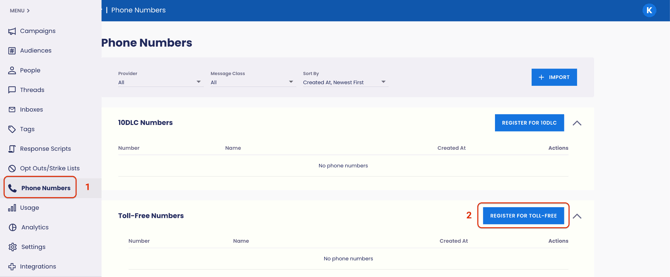
- Navigate to your Scale to Win Text account’s Phone Numbers page.
- Click Register for Toll-Free. This takes you to the Toll-Free registration form.
- After selecting "Political Campaign, Party, or PAC" as the Organization Type, the Campaign Verify Token field becomes visible.
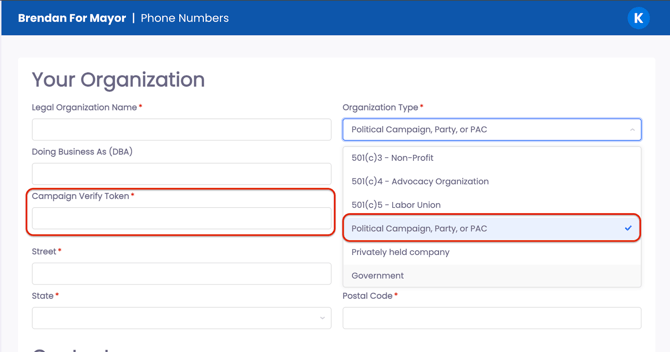
- Enter your Campaign Verify token.
- Complete the form and click Submit For Review.

View The Status Of Your Registration
You can view the status of your registration in your Phone Numbers page. Expect your registration to remain in "pending" status for 1-4 business days while downstream vendors read through your submission for approval.
- Note: Registrations must be vetted by a third-party organization and can take 2-4 business days to complete once submitted to Scale to Win. Registrations can take longer if issues arise.
Once your registration is approved, admins will receive an email notification. You can then access your toll-free number(s) in your text campaigns.
Manage Your Toll-Free Numbers
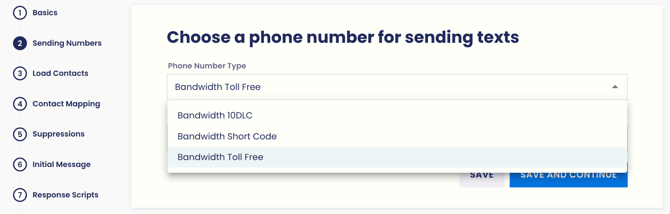
To make a Toll-Free number your default sending number, or give your numbers labels, you can do so in the Phone Numbers page. Click the pencil icon to edit the number's “name”. Click the star icon to make the number your default, i.e. the number automatically chosen to send from in new campaigns.
Registering Multiple Teams
Accounts with multiple teams or subaccounts can register individual subaccounts for Toll-Free by following the same steps above. To set up subaccounts, follow the steps outlined in this article. For each subaccount you wish to register as a separate entity, submit the Toll-Free registration form in that subaccount's Phone Numbers page.
Note: To apply the same Toll-Free registration to more than one subaccount, reach out to our Client Support team.
Toll-Free Registration Requirements
Registration involves sharing information about your organization so that its identity can be vetted. Here’s what you’ll need to submit:
|
Legal Organization Name |
The name of your organization as it appears on your tax forms. If you are texting under a different name, include the "doing business as" name alongside the legal organization name, i.e. "Scale to Win LLC (DBA: Scale to Win)" |
|
Organization Address |
The address of your organization as it appears on your tax forms. |
|
EIN |
A Business Registration Number (BRN), such as an Employer Identification Number (EIN), is required to register for a Toll-Free number. |
|
Campaign Verify Token |
Campaign Verify (CV) tokens are now required for political committees, campaigns, parties, and PACs texting on the Toll-Free channel. Learn more here. |
|
Contact Information |
Submit the contact information for a person working directly at the organization. The vetting process will include looking at the domain of the email address to see if it roughly matches the domain of the website. This person will not be contacted. If you are submitting on behalf of another organization, and prefer to be the primary point of contact, you can enter your contact information into the primary contact fields in addition to the organization contact information. When the registration is complete, you will be informed instead of the organization contact. |
|
Website with privacy policy |
You must submit a working website to register for Toll-free. This website can be as simple as an ActBlue page, but it must be connected to your organization and include identifying information. Additionally, the carriers expect to see a privacy policy specific to your organization on the website. So if you use ActBlue as your primary website, you'll still want to link to your own organization's privacy policy on the page. |
|
Opt-in page |
You must submit a webform meeting carrier requirements for collecting phone numbers and opt-in consent. This form can be on your website or it can be a separate form. If you don't have a privacy policy on your website, it should be on this form. Opt-in forms must have the following elements:
|
|
Use Case |
Brief description of your messaging. Examples include political organizing, fundraising, advocacy, membership updates, and event planning. |
|
Sample Scripts |
Provide a short example of a message that reasonably encapsulates your use case. Include sender identification that matches your organization name, as well as opt-out instructions. "Hi {firstName}! Just texting to remind you to vote today. Based on the best publicly available info, if you're still in the {zip} zip code, you can vote at Jon Jay High School from 7 am-7 pm. I'm with Scale to Win [sender ID], reply with questions or stop to opt-out [opt-out instructions]. " |
Website Requirements
You must submit a website that is active and publicly accessible. The website can be a Facebook page or an ActBlue page, but it must be for the organization you are registering. Read more about website requirements here.
FAQs
How long will it take to get approved?
Registrations currently take around 2-3 business days to be approved, but can take up to 5-7 business days to be approved in higher-volume periods. You’ll want to submit a registration at least 5 days in advance of when you plan to text.
Why should I register for Toll-Free?
• No monthly set-up fees
• No charges for numbers
• Uncapped daily volume for all organizations
• Relatively quick approval times
• Great deliverability for opted-in lists
What are some of the downsides to using Toll-Free?
• Filtering: Toll-Free numbers are prone to heavy filtering, especially if your messages are triggering high opt-out rates and spam complaints
• Hidden Cap: Your Toll-Free number may be subject to a hidden daily cap if carriers see high opt-out rates on a specific day
• Number Limitation: Maximum of 5 numbers per registration
Note: If you prefer to only text with 10DLC, then you do not need to register for toll-free.