
Scale to Win Text now allows organizations to manage an opt-in program using a 10DLC, and/or a Toll-Free number. Previously opt-in audiences were only available to organizations with a Short Code number. Running an opt-in program is key for developing and cultivating highly engaged, warm contact lists.
Organizations can use a long code opt-in number to manage an opt-in audience and create Saved Searches in a warm list without paying a Short Code rental fee.
Request a 10DLC or Toll-Free Number for Opt-In Texting
If you are interested in setting up a 10DLC or Toll-Free number to message a subscribed audience, please submit a ticket to our Client Support team, or book time to chat with our Registration Ops Team.
Scale to Win staff will add a new 10DLC or Toll-Free number that is strictly designated for texting contacts who have explicitly opted in to receive messages from your organization.
Note: You will need an active 10DLC or Toll-Free registration to use this feature. Our team will provision a new 10DLC number that hasn’t texted contacts who have not opted-in previously. Read here for more information about phone number registrations.
Add Contacts to Your Subscriber Audience
Once the Scale to Win Team has imported your new opt-in number to your subaccount, you’ll be able to add contacts to your Subscriber Audience.
You can add subscribers to your opt-in audience by any of the following methods:
- CSV upload (detailed below)
- Manual text entry
- Import via the Actionkit Webhook Integration
- Import previous subscribers via the ActBlue Import Integration
- Import new subscribers via the ActBlue Webhook Integration
- Import via API
At this time, Scale to Win Text does not support keyword autoresponders for opt-ins on long code numbers, i.e. “Text ‘Join’ to subscribe”.
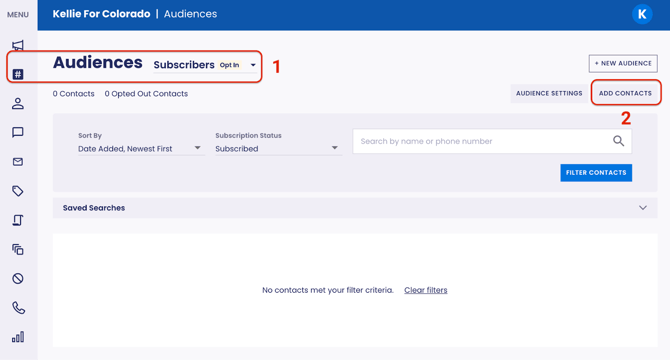
- Navigate to your Audiences page and make sure you are adding contacts to your Opt-In Subscriber Audience.
- Click Add Contacts.
- Select your upload method and upload contacts that have explicitly opted in.
- Click Upload.
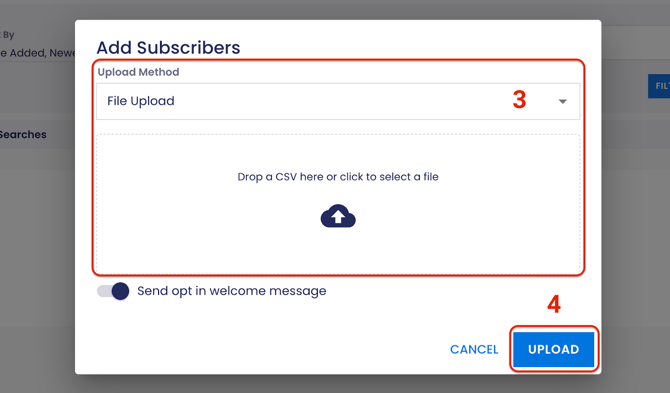
Note: If the subscribers have already received a welcome message, turn off the “Send opt in welcome message” toggle. If the contacts are new subscribers make sure this toggle is turned on.
Use Your Opt-In 10DLC or Toll-Free Number in a Campaign
- In the Sending Numbers step of building your campaign, select your opt-in 10DLC or Toll-Free number from the Phone Number menu, then click Save And Continue.
Note: These numbers are marked with a yellow Opt-In flag.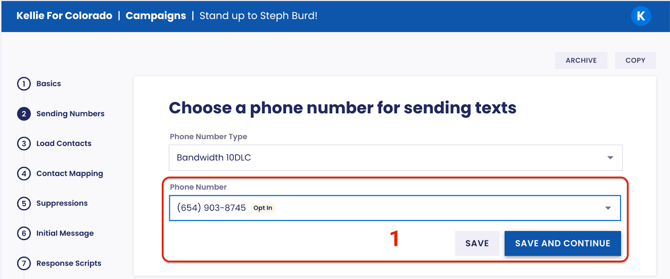
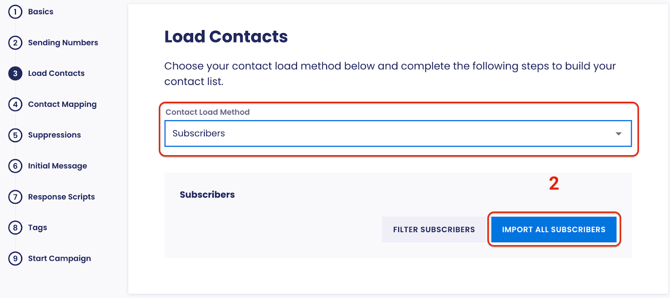
- In the Load Contacts step select Subscribers from the drop-down menu and click Import All Subscribers.
- Review your list, then click Continue to finish building your campaign.
Note: When a subscriber opts out from an opt-in 10DLC or Toll-Free number, that opt-out is applied to all opt-in sending in the subaccount. This means that the subscriber cannot be messaged from any opt-in numbers added to that audience, including Short Codes.
How Can This Feature Help Your Organization?
1. Higher-Quality, Engaged Audiences and Faster List Growth
-
Higher-Quality Audiences: By building an audience of opted-in contacts, you are texting people who have explicitly consented, which leads to improved trust, better reply rates, higher click-throughs, and more donations from a "warm list."
-
Faster Growth: You can immediately start collecting SMS opt-ins and messaging subscribers using an opt-in 10DLC or Toll-Free number while waiting for a Short Code to be provisioned, shortening the time between campaign intent and launch.
2. Stronger Compliance and Risk Reduction
-
Enforced Opt-In Status: Opt-in status is enforced at the number and audience level, ensuring you only message your opted-in contacts.
-
Opt-Out Management: Opt-outs are automatically applied across the entire opt-in audience, even if an opted out number is added later.
-
Impact: This feature reduces the risk of carrier filtering, fines, or account issues by providing automated compliance for your teams.
3. Lower Cost Access to Advanced Features and Easier Campaign Creation
-
Lower Cost Features: Access to automated audience growth features, like our Actionkit Webhook Integration and ActBlue Webhook Integration, were previously only available to organizations with a Short Code program. Now you can access these features with the lower cost of a 10DLC or Toll-Free number.
-
Guardrails for Teams: Opt-in numbers are clearly labeled, and only opted-in contacts can be texted, which ensures fewer mistakes in high-stakes campaigns.